
Deliverability
SPF, DKIM and DMARC: What They Do and How to Set Them Up for Ecommerce Email
Quick answer: SPF, DKIM and DMARC are the three email authentication standards that prove an email really comes from your domain. SPF lists the servers allowed to send for your domain, DKIM adds a digital signature to every email, and DMARC tells inbox providers what to do when a message fails those checks. Gmail, Yahoo and Outlook.com require all three from bulk senders. In Klaviyo, a branded sending domain takes care of SPF and DKIM, and DMARC is the one record you add yourself.
When we check the technical setup of an ecommerce account, DMARC is usually the missing piece.
SPF and DKIM are often fine, because the email platform set them up. DMARC needs someone to log in to the DNS settings and add a record. That step gets skipped.
Here's what each standard does, how they work together, a DMARC record you can copy, how to check your setup and when to move past p=none.
By Emiel Dingemans, Founder of Magicianly
Updated
What Are SPF, DKIM and DMARC?
SPF, DKIM and DMARC are records in your domain's DNS that let inbox providers like Gmail check whether an email that claims to be from your brand really is. Each one does a different job.
- SPF (Sender Policy Framework) lists the servers and services that are allowed to send email for a domain.
- DKIM (DomainKeys Identified Mail) adds a digital signature to the email header. The receiving server checks it against a public key in your DNS, so it can tell the message wasn't changed on the way.
- DMARC (Domain-based Message Authentication, Reporting and Conformance) builds on SPF and DKIM. It tells inbox providers what to do with email that fails, and where to send reports about it.
| SPF | DKIM | DMARC | |
|---|---|---|---|
| What it checks | Was the email sent from a server the domain allows? | Was the email signed by the domain, and left unchanged? | Did SPF or DKIM pass for a domain that matches the From address? |
| Where it lives | A TXT record on the sending domain | A public key in the DNS of the signing domain | A TXT record at _dmarc.yourbrand.com |
| Who sets it up in Klaviyo | Klaviyo, through your branded sending domain records | Klaviyo, through your branded sending domain records | You, at your DNS provider |
How Do SPF, DKIM and DMARC Work Together?
DMARC sits on top of the other two. An email passes DMARC when SPF or DKIM passes and the domain that passed matches the domain in the From address. That match is called alignment.
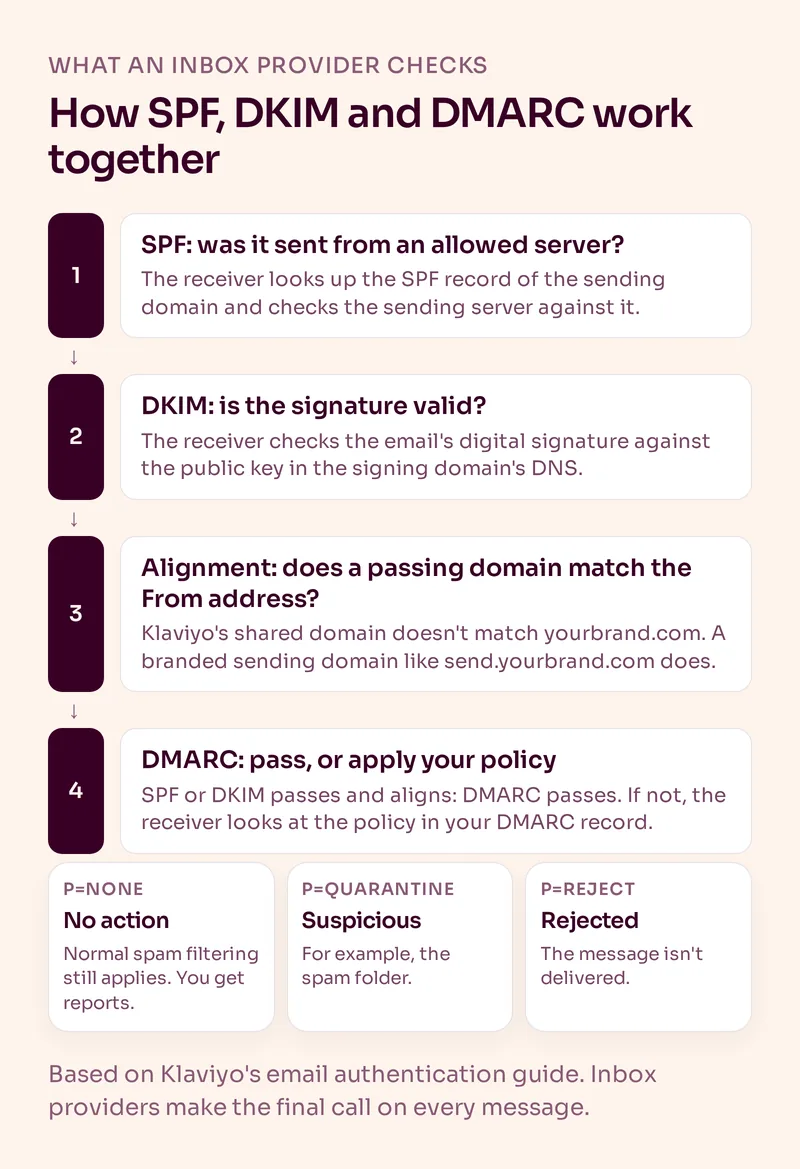
Alignment is the part that's easy to miss. Say you send from hello@yourbrand.com on Klaviyo's shared sending domain. Klaviyo's domain passes its own checks, but it isn't yourbrand.com, so it doesn't align. Klaviyo says it plainly: a policy on its shared domain doesn't make your emails pass DMARC.
A branded sending domain fixes that. You send through a subdomain like send.yourbrand.com, the email is signed for your own domain and, under the default relaxed alignment, that counts as a match. That's why we always set up the branded sending domain in Klaviyo and DMARC together, in the same session.
Do Ecommerce Brands Need SPF, DKIM and DMARC?
Yes. Gmail, Yahoo and Outlook.com all require SPF, DKIM and a DMARC record from senders who send more than about 5,000 emails a day, and an ecommerce brand with a list of that size passes the line with one campaign.
| Inbox provider | Who it applies to | What's required |
|---|---|---|
| Gmail | Senders of 5,000 or more messages a day to Gmail accounts | SPF and DKIM, a DMARC record (the policy can be none), and a From domain that aligns with SPF or DKIM |
| Yahoo | Bulk senders | SPF and DKIM, and a valid DMARC policy of at least p=none that passes |
| Outlook.com | Domains sending over 5,000 emails a day | SPF and DKIM must pass, and DMARC of at least p=none, aligned with SPF or DKIM |
Gmail's bulk sender rules also ask for one-click unsubscribe and a spam rate below 0.3% in Postmaster Tools. Authentication is only one line of the list. We go through the rest in our email deliverability checklist.
Sources: Gmail email sender guidelines, Yahoo sender best practices and Microsoft's Outlook requirements for high-volume senders, checked November 2026.
Klaviyo itself recommends a branded sending domain with DMARC for accounts with 5,000 or more active email profiles. If you're anywhere near that number, just treat yourself as a bulk sender.
How Do You Set Up SPF, DKIM and DMARC in Klaviyo?
Set up a branded sending domain in Klaviyo, which handles SPF and DKIM for you, then add one DMARC record at your DNS provider. That's the whole job for most brands.
- Set up a branded sending domain. In Klaviyo, go to Settings > Domains and use a subdomain, such as send.yourbrand.com.
- Add the records Klaviyo shows you at your DNS provider (Shopify, Cloudflare, GoDaddy and so on), plus the TXT verification record on your root domain. For supported providers, Klaviyo can publish them for you through Entri.
- Don't add a separate SPF record for Klaviyo. Klaviyo's own documentation says the branded sending domain records already connect to the SPF and DKIM records it manages.
- Check for an existing DMARC record at _dmarc.yourbrand.com. Other tools sometimes made you add one already. If it's there, review it instead of adding a second one.
- No DMARC record yet? Add one. Klaviyo offers to generate v=DMARC1; p=none during setup, or you can use the version with a reporting address below.
- Send from an address on your own domain, like hello@yourbrand.com. Never from a Gmail or Outlook address.
You need access to the DNS settings for steps 2 and 5. If nobody on your team has that, find out who does before you start.
What Does a DMARC Record Look Like?
A DMARC record is a single TXT record at _dmarc.yourbrand.com. The simplest valid version is v=DMARC1; p=none.
Type: TXT
Host: _dmarc (some DNS providers want the full _dmarc.yourbrand.com)
Value: v=DMARC1; p=none; rua=mailto:dmarc-reports@yourbrand.com
Swap the reporting address for an inbox you actually own. If you don't want reports, v=DMARC1; p=none on its own is enough to meet the requirement.
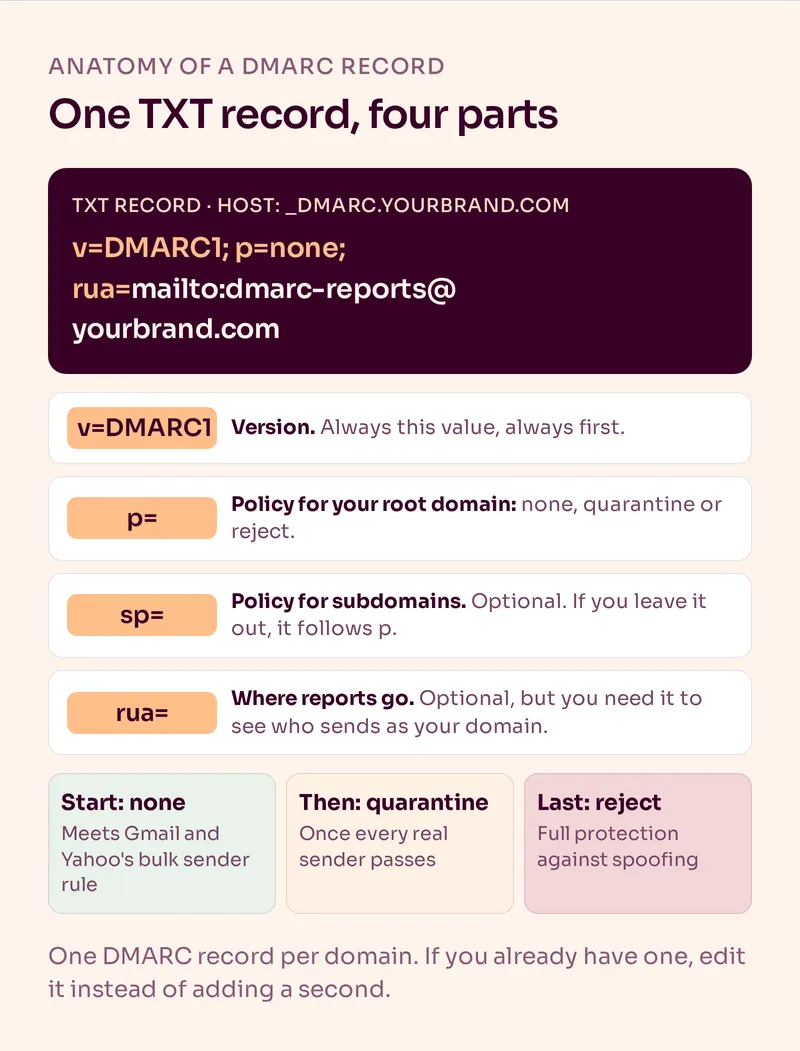
The parts that matter:
- v=DMARC1 is the version. It's always this, and it always comes first.
- p= is the policy for your root domain: none, quarantine or reject.
- sp= is the policy for subdomains. It's optional, and if you leave it out it follows p.
- rua= is the address that receives aggregate reports. Also optional, but without it you can't see who's sending email as your domain.
The reports arrive as XML files, and they're not fun to read. Klaviyo suggests a DMARC service provider if you want to use them, and names Valimail, EasyDMARC and Dmarcian as examples.
Which DMARC Policy Should You Use: None, Quarantine or Reject?
Start with p=none. It meets the Gmail and Yahoo requirement and lets you watch who sends as your domain before you block anything. Move to quarantine or reject only once every legitimate sender passes.
| Policy | What it asks inbox providers to do with failing email | When we'd use it |
|---|---|---|
| p=none | Nothing based on DMARC. Normal spam filtering still applies | The starting point for every brand that has no DMARC record yet |
| p=quarantine | Treat it as suspicious, for example by putting it in spam | Once the reports show all your real senders pass |
| p=reject | Reject it | When you want full protection against spoofing, and you're sure nothing legitimate fails |
Why not go straight to reject? Because your domain sends a lot more than Klaviyo email. Order notifications from Shopify, replies from your helpdesk, invoices, your team's own inboxes in Google Workspace or Microsoft 365. If one of those isn't authenticated properly, a strict policy blocks real email, and the first thing you'll notice is customers asking where their order confirmation went.
Klaviyo recommends working with your IT team or a specialist before you move to a stricter policy, and we agree. The one reason we'd push for it: BIMI, the logo next to your sender name in supporting inboxes, needs quarantine or reject.
How Do You Check Whether SPF, DKIM and DMARC Are Working?
Run your domain through a free DMARC lookup, then send yourself a test email to a Gmail address and read the authentication results in the message.
- DMARC lookup. A tool like MXToolbox's DMARC check shows whether a record exists and is valid. "No DMARC record found" means you still need to add one.
- Klaviyo. Under Settings > Domains, your branded sending domain should show as verified, and then active.
- A test email to Gmail. Open it, click the three dots and choose "Show original". You'll see SPF, DKIM and DMARC listed as PASS or FAIL.
- Google Postmaster Tools. Once you're sending real volume to Gmail, it shows your spam rate and domain reputation over time. Here's how to set up Google Postmaster Tools for Klaviyo.
What Are the Most Common SPF, DKIM and DMARC Mistakes?
Most of these problems come from duplicate records and from being too strict too early.
- Two SPF records on one domain. A domain should have one SPF record. When another tool asks you to add its own, merge it into the existing record instead.
- Too many includes in SPF. SPF allows a limited number of DNS lookups, and Microsoft warns that going over 10 can make the check fail. Old tools you stopped using are the usual cause.
- A second DMARC record. One per domain. Edit the one you have.
- Sending from a free mailbox. A From address on gmail.com can't be authenticated for your brand, and Gmail warns that impersonating Gmail From addresses can hurt delivery.
- Jumping to p=reject on day one, before you know which tools send as your domain.
- Expecting authentication to fix deliverability. It won't. Sending unwanted email to the wrong audience is not solved by a prettier SPF record. If your emails already land in spam, start with how to fix deliverability problems in Klaviyo.
So What Should You Do About SPF, DKIM and DMARC?
Check today whether your domain has a DMARC record. If it doesn't, set up a branded sending domain in Klaviyo and add v=DMARC1; p=none in the same session. Add a reporting address if someone will actually look at the reports. Move to quarantine or reject later, once you know every tool that sends as your domain. Then get back to the things that decide inbox placement: who you email, how often and whether they want it. If you'd like us to handle the setup and the sending, that's part of our Klaviyo management work.
Frequently Asked Questions
What is the difference between SPF, DKIM and DMARC?
SPF lists the servers allowed to send email for your domain. DKIM adds a digital signature that proves the email came from your domain and wasn't changed. DMARC checks that SPF or DKIM passed for a domain matching your From address, and tells inbox providers what to do when that fails.
Do I need SPF, DKIM and DMARC for Klaviyo?
Yes, if you send in any real volume. Gmail, Yahoo and Outlook.com require all three from bulk senders. In Klaviyo, a branded sending domain sets up SPF and DKIM through the records you add during setup. DMARC is a separate TXT record you add at your DNS provider.
What DMARC policy should I start with?
Start with p=none. It meets the Gmail and Yahoo requirement without blocking any email, and with a reporting address you can see which services send as your domain. Move to quarantine or reject only once all your legitimate senders pass.
Can a domain have two SPF or two DMARC records?
No. A domain should have one SPF record and one DMARC record. If a new tool asks you to add SPF, merge it into your existing SPF record. If a DMARC record already exists, edit it instead of adding a second one.
What happens if I don't have a DMARC record?
If you send more than about 5,000 emails a day, you don't meet the sender requirements of Gmail, Yahoo and Outlook.com, so your email may be filtered to spam or rejected. Your domain is also easier to spoof, because inbox providers have no policy to follow.
Does DMARC improve email deliverability?
DMARC is the entry requirement, not the fix. Without it, bulk email can be filtered or rejected. With it, you meet the rules and protect your domain. Inbox placement after that depends on engagement, list quality and spam complaints.
Want Us to Build and Manage This for You?
Related Reading
Deliverability
How to Set Up a Branded Sending Domain in KlaviyoA practical guide to setting up a branded sending domain in Klaviyo and understanding where it fits into your wider email authentication setup.
Read NowDeliverability
Email Deliverability Checklist for Ecommerce Brands in 2026Deliverability is mostly the result of who you send to, how often and whether they want it. Here is the checklist we work through for ecommerce email programs.
Read NowDeliverability
BIMI for Email: What It Is, What It Costs and Whether Your Brand Needs ItBIMI puts your logo next to your emails in Gmail and Yahoo. What it needs, what it costs, VMC vs CMC, and when it's worth doing for an ecommerce brand.
Read NowDeliverability
Google Postmaster Tools: How to Set It Up and Read It for KlaviyoGmail never tells Klaviyo who hit Report spam. Here's how to set up Google Postmaster Tools, read each dashboard and keep your spam rate under 0.10%.
Read Now