
Deliverability
Email Engagement: Why a Smaller Engaged List Makes More Money
Quick answer: Email engagement is how people react after you hit send: do they click, visit your site, buy, or ignore you? Gmail and Outlook use those reactions to decide whether your emails land in the inbox, in Promotions or in spam, and that decision affects your whole list. That's why we send regular campaigns only to people who engaged in the last 90 days, and why a smaller engaged list often makes more money than a big one.
By Emiel Dingemans, Founder of Magicianly
Updated
Every founder loves telling us how big their email list is. "We've got over 100,000 subscribers." Sounds great.
But we've seen brands with 100,000 subscribers make less from email than brands with 20,000. The difference is almost always engagement.
What Is Email Engagement?
Email engagement is any sign that a subscriber still wants your emails. For an ecommerce brand, the signals that matter most are clicks, site visits and orders. Opens count too, just a lot less than they used to.
We call someone engaged if they clicked an email, visited your site or placed an order in the last 90 days. Everyone else is unengaged for now. Not gone. Just not someone who gets every campaign.
Which Email Engagement Signals Can You Trust?
Orders, clicks and site visits, because each one needs a real person to do something. Opens are the weakest signal now. Apple Mail Privacy Protection opens emails automatically, so plenty of opens happen without anyone reading a word.
| Signal | What it tells you | How we use it |
|---|---|---|
| Placed an order | They still buy from you | The strongest sign there is |
| Clicked an email | They read it and wanted more | The core of the engaged segment |
| Visited your site | They're still interested, even without clicking | Counts as engaged |
| Opened an email | Maybe nothing, because Apple Mail opens emails automatically | A rough health check, never a deciding metric |
| Unsubscribed | They're done, and they left politely | Normal. Watch the trend, don't panic |
| Marked as spam | They told their inbox your email was unwanted | Never email them again. This is the one that hurts |
If you want to strip Apple opens and bot clicks out of your segments, here's why your Klaviyo open rates aren't always real and how to filter them.
Why Does Email Engagement Affect Deliverability?
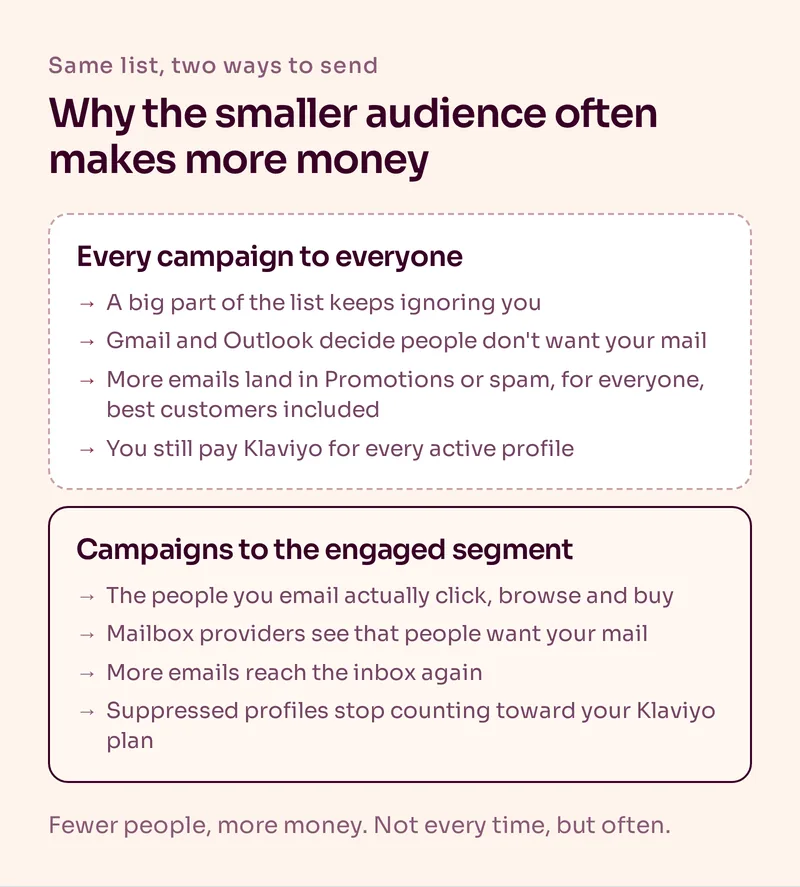
Because mailbox providers watch how people react to you. If a big part of your list keeps ignoring your emails, Gmail and Outlook figure people don't want them and start putting you in Promotions or even spam.
Here's the painful part: it doesn't stay with the people who ignore you. Placement drops for everyone on the list, including your best customers.
Spam complaints are the sharpest version of this. Gmail's sender guidelines say to keep the spam rate shown in Postmaster Tools below 0.3%. You can check yours in Google Postmaster Tools.
- An unsubscribe is someone leaving politely. It doesn't hurt your deliverability.
- A spam complaint tells the inbox your email was unwanted. That one does hurt.
- Gmail's one-click unsubscribe button has pushed unsubscribe rates up, and that's fine. We'd much rather people unsubscribe than hit spam.
Why Can a Smaller Email List Make More Money?
Because subscribers who never engage cost you twice. Once on your Klaviyo bill, and again in worse inbox placement for everyone else.
Klaviyo prices its email plans by active profiles, which means every profile you can email. A subscriber who hasn't clicked anything in a year still counts. Once you suppress profiles, they stop counting toward your plan, though you may have to move to the lower tier yourself.
Then there's placement. When you stop sending every campaign to people who ignore you, a bigger share of the people you do email actually react, and more of your emails reach the inbox again. Fewer people, more money. It doesn't happen every time, but it happens a lot.
Who Should Get Your Campaigns?
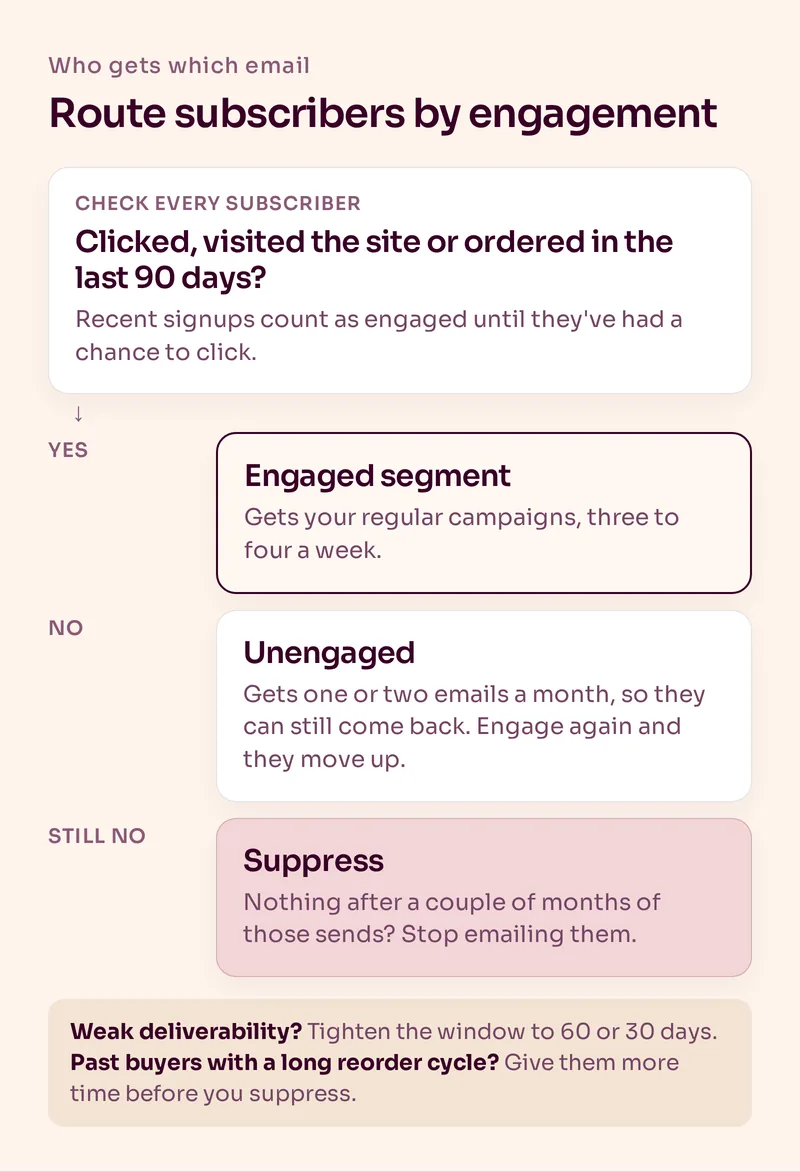
Your engaged segment gets your regular campaigns. Everyone else gets one or two emails a month, and if they still don't engage after a couple of months, you stop emailing them.
In practice:
- Engaged: clicked, visited the site or ordered in the last 90 days. Add recent signups too, so new subscribers don't get left out before they've had a chance to click. This group gets your regular campaigns.
- Weak deliverability: tighten the window to 60 or 30 days until things recover.
- Unengaged: one or two emails a month, so they still have a chance to come back.
- Still nothing after a couple of months: suppress them from marketing email.
One exception: don't treat past buyers like people who never bought. Someone with a long reorder cycle can look quiet and still be one of your best customers. Our guide to email list cleaning covers when to suppress and when to wait. For building the segments themselves, see our Klaviyo segmentation strategy.
What Open Rate Should Your Engaged Segment Get?
We aim for 50% or higher on campaigns sent to the engaged segment. Because Apple Mail inflates opens, that's not a precise number. It's a quick health check.
If an engaged send drops well below that, look at where your emails are landing before you blame the subject line.
How Do You Increase Email Engagement?
Send to the right people, send often enough to be noticed, and make the emails worth opening. Here's the short version:
- Stop sending every campaign to everyone. Regular campaigns go to the engaged list. The rest get one or two emails a month.
- Send more often, not less. Three to four emails a week to the engaged list keeps you visible. One a week is easy to scroll past.
- Make most emails worth opening. Customer stories, product tips, behind the scenes, new launches. Not three discounts a week.
- Keep your flows fresh. Expired codes and sold-out products make your flows earn less than they could. We review ours every six months.
- Make leaving easy. A clear unsubscribe link is always better than a spam complaint.
We go through each of these in more detail in our email marketing best practices.
So Is a Big Email List Worth It?
Only the engaged part of it. List size is the number founders like to quote. Engagement is the number that pays.
Send to the people who still want to hear from you, give the rest a fair chance to come back, and let go of the ones who don't.
Frequently Asked Questions
What is email engagement?
Email engagement is how subscribers react to your emails: clicking, visiting your site, buying, or ignoring you. Mailbox providers like Gmail and Outlook use those reactions to decide where your emails land.
What counts as an engaged subscriber?
We count someone as engaged if they clicked an email, visited your site or placed an order in the last 90 days. If your deliverability is weak, tighten that to 60 or 30 days.
Are open rates still a good engagement metric?
Not on their own. Apple Mail Privacy Protection opens emails automatically, so many opens aren't real reads. Use clicks, site visits and orders for decisions, and opens only as a rough health check.
What should you do with unengaged subscribers?
Email them once or twice a month so they have a chance to come back. If they still don't engage after a couple of months, suppress them. Be more patient with past buyers who have a long reorder cycle.
Does low engagement hurt email deliverability?
Yes. When a big part of your list ignores your emails, Gmail and Outlook are more likely to send your mail to Promotions or spam, and that affects your engaged subscribers too.
Do unsubscribes hurt email deliverability?
No. An unsubscribe is a polite exit. Spam complaints are what hurt, and Gmail asks senders to keep their spam rate below 0.3%.
Want Us to Build and Manage This for You?
Related Reading
Retention Strategy
Email Marketing Best Practices: 5 Lessons From Sending 700 Million EmailsFive lessons from 700 million emails: why a big list is a vanity metric, why flows go stale, why discounts train people to wait, and why most A/B tests are coin flips.
Read NowDeliverability
Email List Cleaning: When to Suppress Inactive SubscribersA bigger email list is not automatically a better email list. Here is how we separate inactive subscribers from valuable past customers and when suppression actually makes sense.
Read NowAnalytics & Testing
Are Your Klaviyo Open Rates Real? Apple Mail Privacy and Bot Clicks ExplainedOpen rates in Klaviyo are not always human opens. Apple Mail Privacy Protection and bot clicks can inflate the number. Here is how we treat them in segments and attribution.
Read NowEmail Automations
Sunset Flow vs Winback Flow: When Should You Stop Emailing Someone?Do not suppress valuable customers for one unopened email. Use winback for lapsed buyers still worth recovering, and sunset when inactivity is long-term and multi-signal.
Read Now