
Retention Strategy
Post-Purchase Upsells: How to Add a One-Click Offer After Checkout on Shopify
Quick answer: A post-purchase upsell is a one-click offer shown right after someone completes checkout, before the thank you page. The customer can add a product to the order they just paid for without entering their payment details again. On Shopify it runs through a post-purchase app such as Aftersell or Upsell.com. The best offer is a relevant add-on: a complementary product, a refill, a bundle upgrade, an accessory or a frequently bought together item.
You paid for the click. You earned the sale. The customer's card is still out.
And then most stores just let them leave.
A post-purchase upsell is one of the few ways to grow revenue without more ad spend. Same traffic, same conversion rate, bigger orders. In the profit-first framework we use with brands whose ad margins are getting squeezed, it's step one, before anyone touches the ads.
It's also easy to get wrong in a way that annoys people seconds after they trusted you with their money. Here's how it works on Shopify, what to offer and how to judge it.
By Emiel Dingemans, Founder of Magicianly
Updated
What Is a Post-Purchase Upsell?
A post-purchase upsell is an offer that appears after the customer pays and before they see their order confirmation. If they accept, the product is added to the same order, usually with one click.
Strictly speaking, most post-purchase offers are cross-sells: they add something that goes with the purchase instead of a bigger version of it. Everyone calls it an upsell anyway. We explain the difference properly in our cross-sell flow guide.
What makes this moment different from every other place you could show an offer:
- No card details. The customer doesn't have to type their payment details again to accept.
- A smaller question. They've already decided to buy from you. You're only asking about one more item.
- No risk to the first order. The offer comes after the order is placed, so it can't make anyone abandon the original purchase.
That last point is why we'd rather add an offer here than pile more of them into the cart.
Where Can You Show an Upsell on Shopify?
You can show an extra product in five places, and the post-purchase page is the only one that comes after payment. Everything before it adds a decision while the customer is still deciding whether to buy at all.
| Where | When the customer sees it | What to keep in mind |
|---|---|---|
| Product page | While choosing the product | Can distract from the main product |
| Cart or cart drawer | Before checkout | Adds a decision before they pay |
| Checkout | During checkout | Offers in the information, shipping and payment steps need Shopify Plus |
| Post-purchase page | After payment, before the thank you page | One click, no new card details |
| Email after the order | Days or weeks later | Best for products they need once they've used the first one |
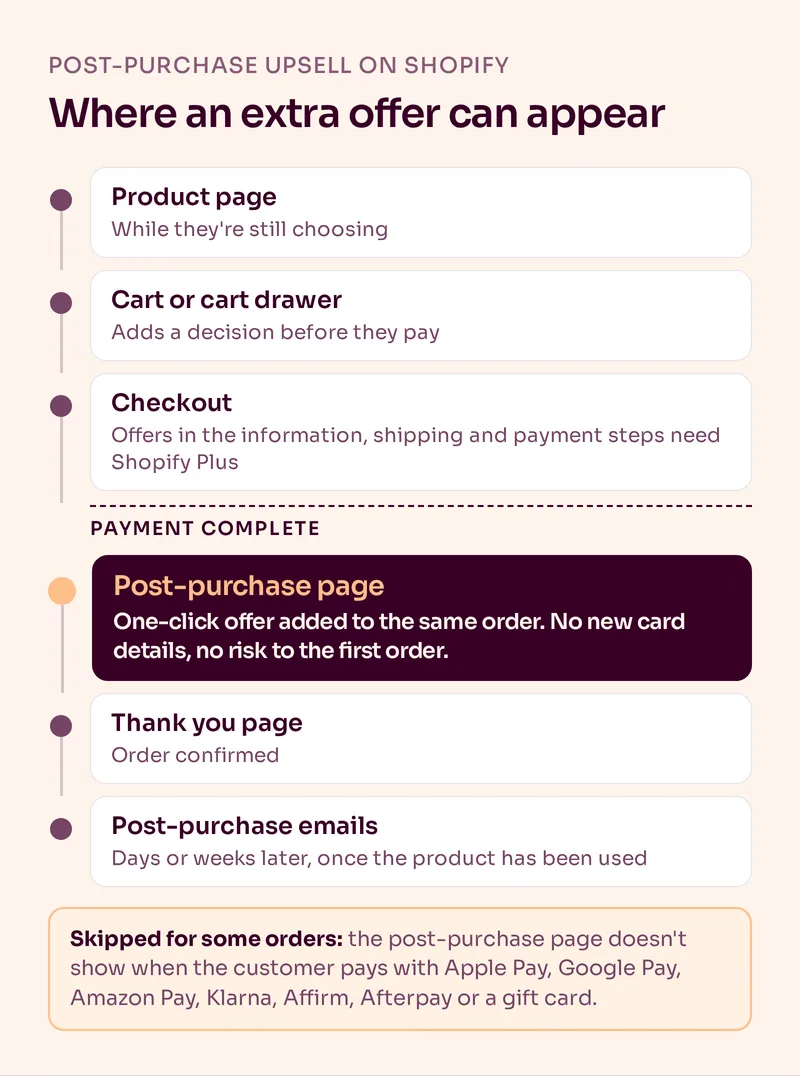
The email version is a different tool. That's your post-purchase flow, where the next product shows up once the customer has had time to use the first one. We cover that timing in our post-purchase email sequence guide.
How Does a Post-Purchase Upsell Work on Shopify?
Shopify supports post-purchase offers through checkout extensions, and in practice you use an app instead of building one. The app decides whether to show the page, shows the offer and adds the product to the original order if the customer accepts.
Two apps built for this are Aftersell and Upsell.com (the app that used to be called ReConvert). Both add one-click post-purchase offers to Shopify, and both also cover other spots such as the cart. The app matters less than the offer you put in it.
A few details from Shopify's developer documentation on post-purchase offers that matter in practice:
- Not every order sees it. The post-purchase page doesn't show when the customer pays with a wallet or installment service, such as Apple Pay, Google Pay, Amazon Pay, Klarna, Affirm or Afterpay, or with a gift card. Orders with duties and multiple currencies are excluded too.
- Only one app can run it. If you've installed two post-purchase apps, you choose one in your Shopify checkout settings.
- Fulfillment waits a moment. Shopify holds fulfillment while the post-purchase offer is open. If the customer closes the page without choosing, the hold lifts one hour after the original checkout.
- Your ad platforms won't see it. Analytics that use Shopify's Pixel API, such as Google Analytics, Meta, Pinterest and Snap, report only the first purchase and its value. Check upsell revenue in the app and in Shopify.
Those limits change how you read the results. A low take rate on a store where lots of customers pay with Apple Pay may simply mean fewer people saw the offer.
What Should You Offer in a Post-Purchase Upsell?
Offer something that makes sense with what they just bought. Our test: it fits the original purchase, accepting it takes no effort, and it feels like an obvious yes for this customer.
The offers that tend to pass:
- A complementary product. The cleanser that goes with the moisturizer, the case that goes with the bottle.
- A refill. For consumables, a refill or second unit of something they'll need anyway.
- A bundle upgrade. Turn the single product into the starter kit.
- An accessory. Smaller, cheaper and clearly useful with the main product.
- A frequently bought together item. Use your own order data to see what people already buy together.
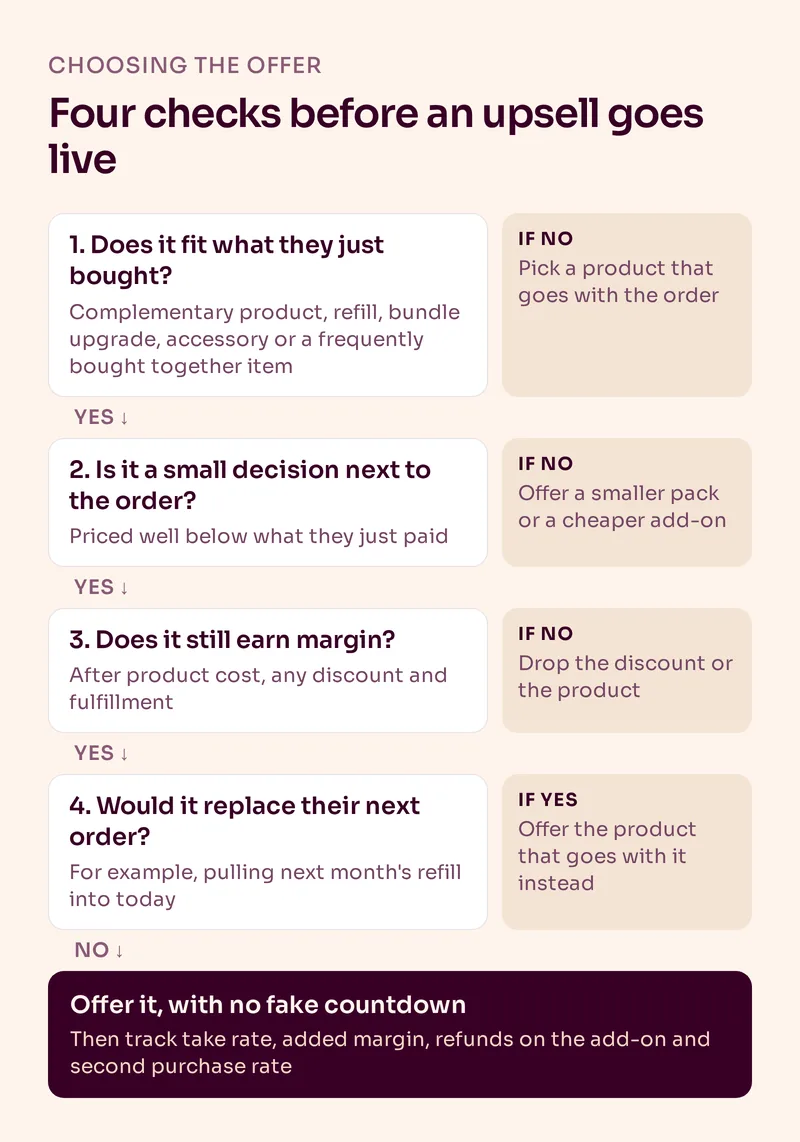
The price should feel small next to the order they just placed. A $25 add-on after a $90 order is an easy yes. A $150 add-on after a $90 order is a second buying decision, and it'll usually get a no (illustrative numbers, but the logic holds).
What we'd avoid:
- More of the same, by default. Someone who just started a coffee subscription doesn't need three extra bags. That's how you create the overload that makes subscribers cancel. Offer the thing that goes with the product instead.
- A random bestseller. If it doesn't connect to the order, it's just an ad.
- Fake urgency. A countdown that resets for every customer is a dark pattern. If the offer only lasts until they leave the page, say that plainly.
Should a Post-Purchase Upsell Include a Discount?
Only if the margin still works after the discount. A small discount can make the offer feel like a thank-you, but the add-on still has to earn money once you count product cost, the discount and any extra fulfillment cost.
Run the numbers per product before you switch it on. Our contribution margin guide shows how. A bigger order is good. A bigger order you paid for in margin isn't.
How Do You Measure a Post-Purchase Upsell?
Judge it on take rate, added margin and what happens to the next order. The revenue number in the app's dashboard is the least useful part.
- Take rate: accepted offers ÷ orders that saw the offer. Even a 10 to 20% take rate on a post-purchase upsell can make a real difference to your AOV.
- Added margin per order: what accepted offers add after product cost, discount and fulfillment.
- AOV: compare average order value before and after, and read it next to conversion rate.
- Refunds on upsell items: if people return the add-on, the offer is wrong.
- Second purchase rate: an upsell shouldn't replace the second order. If the refill they'd have bought next month gets pulled into this order, you've moved revenue, not grown it.
How Does It Fit With Your Post-Purchase Emails?
They're two different moments, and they should know about each other. The upsell page catches the impulse in the seconds after checkout. Your post-purchase emails earn the next order days or weeks later, once the product has been used.
Keep them from repeating each other. If someone just added the refill on the post-purchase page, your cross-sell flow shouldn't push the same refill a week later. And if your post-purchase page already sells the obvious add-on, use the emails for education and the product that comes after it.
Most brands lose more at the other end, in the carts that never convert, and that's a different fix. We cover it in our guide to cart abandonment rate.
So Should You Add a Post-Purchase Upsell?
If your products have natural add-ons, refills or bundles, yes. Pick one relevant offer, priced small next to the order, with no fake urgency and a margin that still works after any discount. Expect not every customer to see it, because wallet and installment payments skip the page. Measure take rate, added margin, refunds and second purchase rate, and make sure your post-purchase emails don't repeat the offer. If you want help planning offers and the flows around them, that's part of our retention marketing work.
Frequently Asked Questions
What is a post-purchase upsell?
It's an offer shown right after the customer completes checkout and before the thank you page. If they accept, the product is added to the order they just paid for, usually with one click and without entering payment details again.
Does Shopify have a built-in post-purchase upsell?
Shopify provides the post-purchase page through checkout extensions, but you need an app to create and show the offers. Apps such as Aftersell and Upsell.com add one-click post-purchase upsells to Shopify stores.
Do you need Shopify Plus for post-purchase upsells?
Shopify limits offers inside the information, shipping and payment steps of checkout to Shopify Plus stores. The post-purchase page is a separate step after payment, where post-purchase apps run. Check the plan requirements of the app you choose.
What should I offer in a post-purchase upsell?
Offer something that makes sense with the original purchase, like a complementary product, a refill, a bundle upgrade, an accessory or a frequently bought together item. Keep the price small next to the order and avoid pushing more of the same product by default.
What is a good take rate for a post-purchase upsell?
There's no universal benchmark. Even a 10 to 20% take rate can make a real difference to your AOV. Judge the offer on added margin and on whether it hurts your second purchase rate, not on take rate alone.
Why don't all customers see my post-purchase offer?
Shopify doesn't show the post-purchase page when the customer pays with a wallet or installment service, such as Apple Pay, Google Pay, Klarna or Afterpay, or with a gift card. Orders with duties and multiple currencies are excluded too.
Want Us to Build and Manage This for You?
Related Reading
Analytics & Testing
Average Order Value (AOV): What It Is, How to Calculate It and How to Increase ItAOV is one of the three numbers behind customer lifetime value. Here's how to calculate it, what Shopify actually counts, and seven ways to raise it without just handing out bigger discounts.
Read NowEmail Automations
How to Build a Cross-Sell Flow That Drives the Second PurchaseCross-sell isn't a catalog dump after checkout. It's one well-timed nudge toward the product that naturally comes next, so first-time buyers turn into second-time customers.
Read NowEmail Automations
Post-Purchase Email Sequence: How to Drive the Second PurchaseA good post-purchase sequence should do more than say thanks. Here is the email-by-email framework we use to improve the customer experience and create the next purchase.
Read NowAnalytics & Testing
Contribution Margin: What It Is, How to Calculate It and Why It Matters for EcommerceContribution margin shows what each sale actually leaves you after the costs of making it. Here's the formula, a worked ecommerce example, how it differs from gross margin and four ways email improves it.
Read Now