
Email Automations
Survey Email: How Ecommerce Brands Get Answers They Can Actually Use
Quick answer: A survey email asks customers one focused question and turns the answer into something you use: a segment, a better flow or a product fix. For ecommerce, keep it to one question, make it answerable in one click and send it when the customer can actually judge what you're asking about. In Klaviyo you can build a one-click survey where each button saves the answer to the customer's profile. And ask "How did you hear about us?" on the thank-you page, not in an email weeks later.
Most survey emails ask for ten minutes and give nothing back. So people ignore them.
The ones that get answered are short and well timed. The bigger problem is usually what happens next. The answers end up in a spreadsheet, and nothing in the email program changes.
Here's how we'd set it up so the answers actually do something.
By Emiel Dingemans, Founder of Magicianly
Updated
What Is a Survey Email?
A survey email is an email that asks the recipient a question about themselves, their order or your brand, and records the answer. For an ecommerce brand, the useful ones are short and tied to a moment in the customer journey.
The answers are zero-party data: information customers tell you directly, like what they're shopping for or how a product worked out. That's more reliable than guessing from clicks, and you can use it right away in segments and flows.
Which Surveys Should an Ecommerce Brand Send, and When?
Ask each question at the moment the customer can answer it. Four moments cover most of what a brand needs to know.
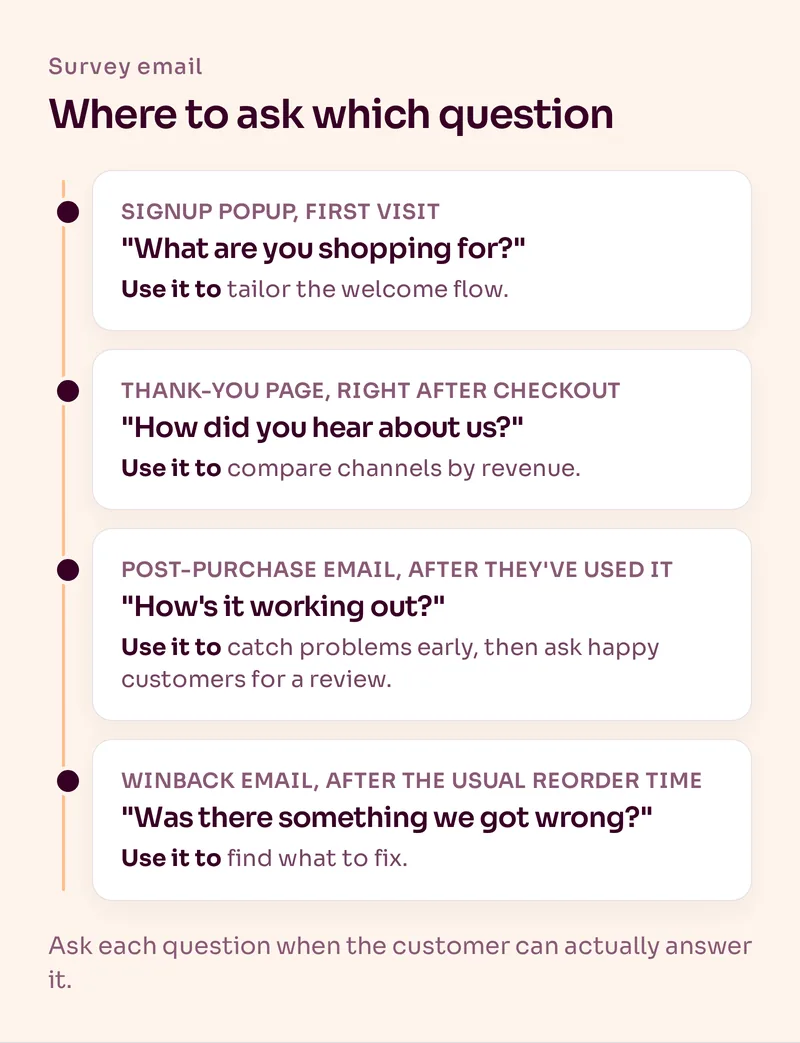
| Survey | Where to ask | When | What you do with the answer |
|---|---|---|---|
| "What are you shopping for?" | Signup popup, before the email field | First visit | Tailor the welcome flow to the answer |
| "How did you hear about us?" | Order confirmation or thank-you page | Right after checkout | Compare marketing channels by revenue |
| "How's it working out?" | Post-purchase email | Once they've had time to use the product | Catch problems early, ask happy customers for a review |
| "Was there something we got wrong?" | Plain-text winback email | After your usual reorder time has passed | Find out what to fix |
Notice that only two of the four are actually emails. The popup question and the attribution question work better on the page where the customer already is.
Why Ask "How Did You Hear About Us?" on the Thank-You Page?
Because right after checkout, the answer is fresh and almost every buyer sees the question. Ask by email two weeks later and you're likely to get fewer answers, from people who half remember.
A post-purchase survey app handles this for Shopify stores. Fairing is one we'd look at: it adds the survey to the thank-you and order status pages, syncs every answer to the customer's Klaviyo profile, and is free up to 200 orders a month before paid plans start at $49 a month (checked November 2026). Fairing also says post-purchase surveys get upwards of five times more responses than typical email surveys. That's their claim, but it matches the logic.
Treat the answers as a second opinion next to your other data, not as the truth. UTMs show what people clicked, a survey shows what people remember, and neither proves what caused the order. We explain that difference in our guides to Klaviyo attribution and email UTM tracking.
We go deeper on the question itself, the answer options and a ready-to-use template in our guide to the how did you hear about us survey.
How Do You Build a One-Click Survey Email in Klaviyo?
Use one button per answer, and give each button a link that saves the answer to the profile before sending the customer to a thank-you page. One click, done.
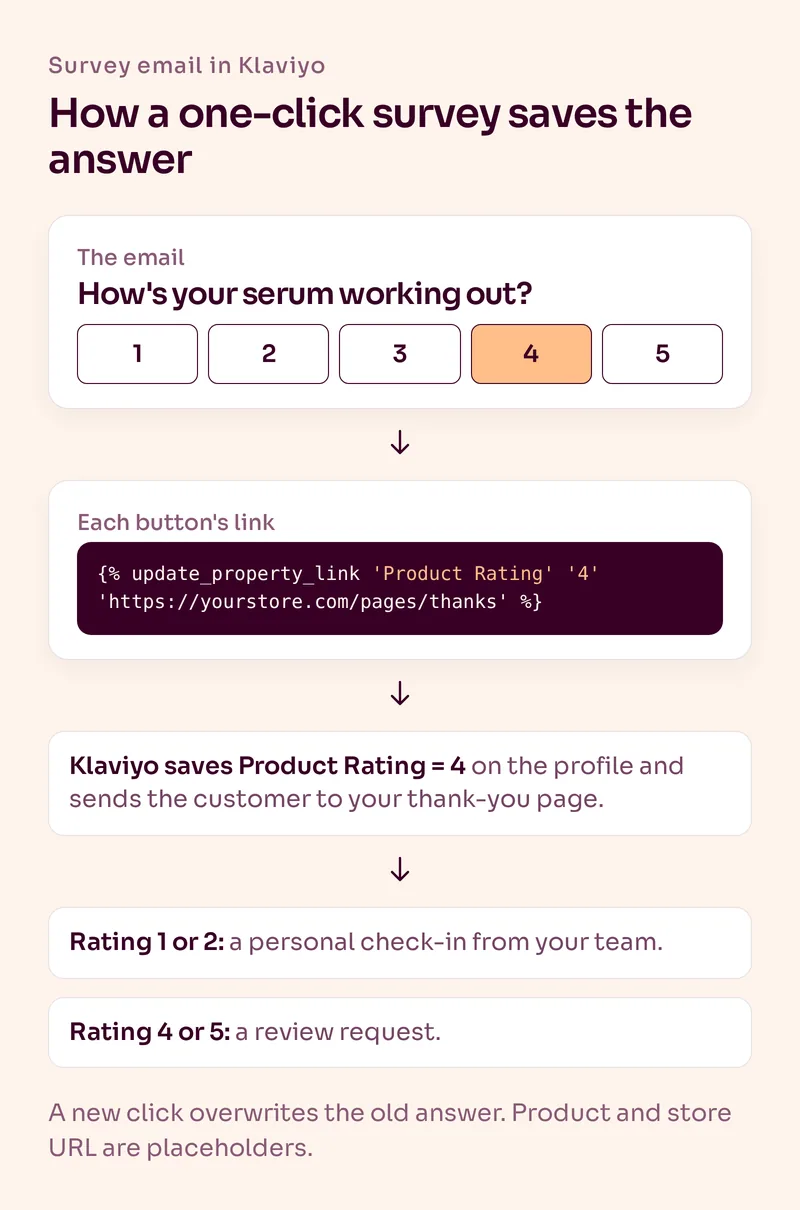
Here's how, based on Klaviyo's guide to rating links:
- Add a row of buttons to the email, one for each answer. Klaviyo's guide uses a header bar block set to links and buttons only.
- In each button's link address, add Klaviyo's update property tag, for example: {% update_property_link 'Product Rating' '4' 'https://yourstore.com/pages/thanks' %}
- Change only the value per button, so the button labeled 1 saves '1', and so on.
- Send yourself a live test. Links in the preview go to a placeholder page, so the only real test is clicking in your inbox and checking that the property appears on your profile.
- Build segments on the answer, for example Product Rating is 1 or 2, and trigger the follow-up you want.
Three things to know. A new click overwrites the earlier answer for the same property. The tag doesn't work in SMS. And bot clicks can trigger these links too, so be careful about acting on a sudden wave of identical answers. Our article on Klaviyo open rates and bot clicks covers the settings.
Need more than one question? Put the first one in the email and the rest on the page the button opens.
How Many Questions Should a Survey Email Have?
One in the email. Every extra question or step loses people, and the first answer is the one you'll use most.
One question: in the email itself, answerable with one click.
Right timing: only ask once the customer can judge it, so not before the product arrives.
Use every answer: each answer should change what that customer gets next. If it changes nothing, don't ask.
That last rule is the one that gets skipped. If you can't name the segment or flow an answer feeds, cut the question.
Survey Email Examples
Here are three examples you can adapt. Northcove is a made-up brand.
1. Post-purchase product check-in
Subject: Quick one: how's the serum working out?
Body: "You've had your Northcove serum for a few weeks now. How's it going? Pick a number from 1 to 5. One click, that's it."
Buttons: 1, 2, 3, 4, 5
2. Winback, plain text
Subject: Can I ask you something?
Body: "Hey Sam, it's been a while since your last order. Was there something we got wrong? Just hit reply. I read every answer. Anna, founder of Northcove"
3. Preference question for subscribers
Subject: What should we send you more of?
Body: "We'd rather send you less of what you skip. What are you most interested in?"
Buttons: Skincare tips, New launches, Offers only
The winback one works as a plain-text email because it should feel like a person asking. For subject lines, say what it is and how long it takes. "Quick question (one click)" beats something clever.
Should You Send a Survey Reminder Email?
Yes, one. Send it only to people who haven't answered, a few days after the first email, and make it shorter than the original. We wouldn't send a second one.
The one-click survey makes this easy in Klaviyo. Each answer is saved as a profile property, so after the survey email add a time delay of a few days, then a conditional split on that property: Product Rating is not set. Only that branch gets the reminder. Everyone who already answered skips it.
A reminder works best as a short plain-text email with the same buttons:
Survey reminder example
Subject: Still curious (one click)
Body: "Hey Sam, no worries if you're busy. How's the serum working out so far? Pick a number and you're done. Anna, founder of Northcove"
Buttons: 1, 2, 3, 4, 5
Leave it there. If someone ignores both emails, that's an answer too. And skip the reminder for anyone with an open support issue about the order.
What Should You Do With the Answers?
Put them on the profile, build segments on them and change what each group gets. That's where a survey pays for itself.
- Low product rating: send a personal check-in from your team, not a review request.
- High product rating: that's the moment for a review request email.
- Preference answers: use them in the welcome flow and in campaign blocks, which our guide to email personalization covers.
- "How did you hear about us?": compare revenue and repeat purchases per answer.
- Winback replies: read them yourself. They're the cheapest product and site research you'll get.
Here's how that looks in the popups we build. The first step asks a question, for example whether someone wants to build muscle or lose weight for a supplement brand. The welcome flow then speaks to that goal. In Alia, the form tool we usually use for Shopify brands, you can even see performance by survey answer, so you know which group buys more and can focus on it.
Affiliate link: we may earn a commission. We recommend Alia because we use it, not because of the commission.
What Are the Most Common Survey Email Mistakes?
- Asking too much. A long survey asks for more time than most customers will give you. Start with one click.
- Asking too early. A product question before the product has arrived, or before it's been used, gets you guesses.
- Asking people who just complained. Check your support tickets before you send a survey to everyone.
- Asking "How did you hear about us?" by email weeks later. Put it on the thank-you page.
- Collecting answers you never use. If nothing changes based on the answer, the customer wasted their click.
Summary
A good survey email asks one question, at the right moment, and every answer changes what that customer gets next. Ask the preference question in your popup, "How did you hear about us?" on the thank-you page, product feedback once the product has been used, and the "what went wrong" question in your winback flow. In Klaviyo, one-click buttons can save each answer straight to the profile.
Most of these questions live in your flows, so start with your post-purchase email sequence. If you'd like us to build and run them for you, see our email automation service.
Frequently Asked Questions
What is a survey email?
A survey email asks the recipient a question about themselves, their order or your brand and records the answer. For ecommerce, the most useful ones ask a single question tied to a moment, like a product check-in after delivery.
When should you send a customer survey email?
When the customer can actually answer the question. Product feedback works once they've had time to use the product, and a "what went wrong" question works after your usual reorder time has passed without an order.
How many questions should a survey email have?
One. Put a single question in the email that people can answer with one click. If you need more, ask the rest on the page the click opens.
Can you add a survey to a Klaviyo email?
Yes. Give each answer button a link with Klaviyo's update property tag. When someone clicks, Klaviyo saves that answer as a property on their profile and sends them to the page you choose.
Where should you ask "How did you hear about us?"
On the order confirmation or thank-you page, right after checkout. The answer is fresh there and almost every buyer sees the question, so you usually get more answers than from a later email.
What is a good subject line for a survey email?
One that says what it is and how long it takes, like "Quick question (one click)" or "How's your order working out?". Clear beats clever, because people decide in a second whether a survey is worth their time.
Should you send a reminder for a survey email?
Yes, but only one, and only to people who haven't answered yet. In Klaviyo, add a time delay after the survey email and a conditional split on the saved answer, so only profiles where the answer is not set get the reminder.
Want Us to Build and Manage This for You?
Related Reading
Email Automations
Post-Purchase Email Sequence: How to Drive the Second PurchaseA good post-purchase sequence should do more than say thanks. Here is the email-by-email framework we use to improve the customer experience and create the next purchase.
Read NowEmail Automations
Review Request Emails: When to Send Them and How to Get More ReviewsDay 7 is not a review strategy. How we time review request emails by product, why the reminder matters, and how to offer a gift without breaking the rules.
Read NowList Growth
What Is a Good Popup Signup Rate for Ecommerce?Most popups are set up once and never touched again. Here is what a good signup rate looks like, how to calculate yours properly and the two levers that move it most.
Read NowRetention Strategy
Email Personalization for Ecommerce: What to Personalize Beyond First NameReal email personalization is not inserting a first name. It is changing what someone receives based on what they viewed, bought, told you or are likely to need next.
Read Now