
Analytics & Testing
Email UTM Tracking: How to Set Up UTMs in Klaviyo for GA4
Quick answer: Email UTM tracking adds small tags to the links in your emails, so Google Analytics knows a visit came from email and from which campaign. In Klaviyo, go to Settings > Other > UTM tracking, set utm_medium to Message type (emails then get utm_medium=email and texts get utm_medium=sms), turn on utm_campaign and switch on Automatically add UTM parameters to links. Then turn tracking on in your existing flow emails, because that switch only applies to new messages.
If GA4 shows hardly any email traffic while Klaviyo shows plenty of revenue, look at your links first.
Either they aren't tagged at all, or they're tagged with values GA4 doesn't recognize as email. Both are quick to fix.
By Emiel Dingemans, Founder of Magicianly
Updated
What Is Email UTM Tracking?
Email UTM tracking means adding UTM parameters, small tags at the end of a URL, to every link in an email. Google Analytics reads those tags and records where the visit came from.
Without them, a click from an email app often shows up in GA4 as direct traffic or a referral, and you can't tell your Black Friday campaign from your welcome flow.
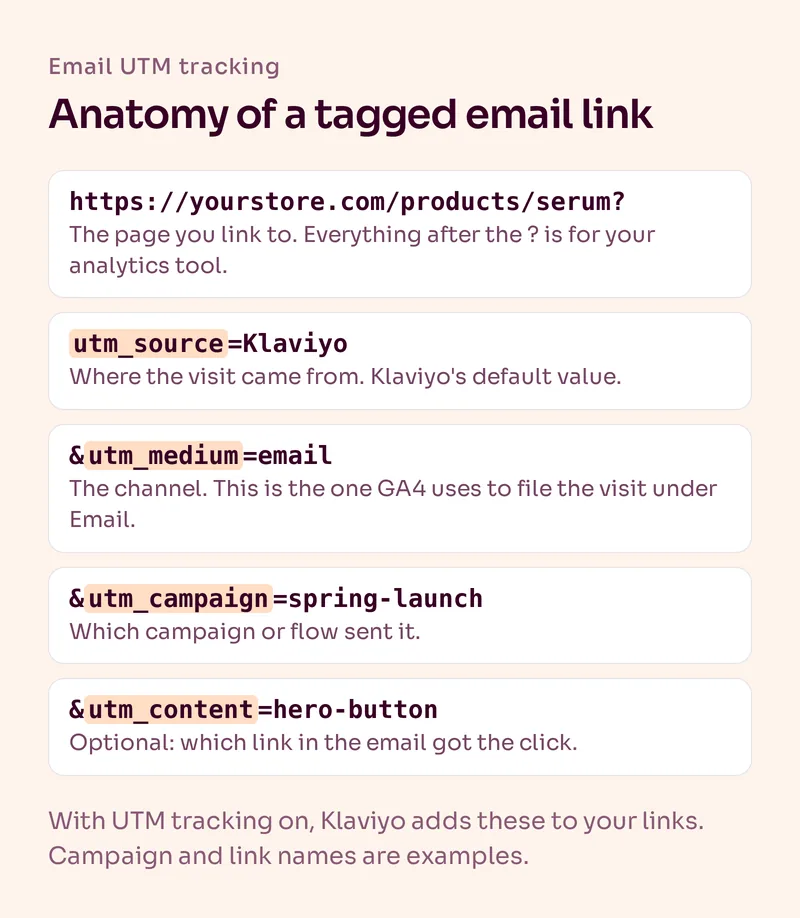
Google recommends that if you set one UTM parameter, you set all the relevant ones, especially utm_source, utm_medium and utm_campaign. Values are case-sensitive, so "Klaviyo" and "klaviyo" show up as two different sources.
Which UTM Parameters Should You Use for Email?
Source, medium and campaign are the ones that matter. Content is a nice extra when an email has more than one important link.
| Parameter | What it tells GA4 | What we use in Klaviyo |
|---|---|---|
| utm_source | Where the visit came from | Klaviyo's default value, Klaviyo |
| utm_medium | Which channel | Message type, so emails get email and texts get sms |
| utm_campaign | Which campaign or flow | A dynamic value that names the campaign or flow |
| utm_content | Which link inside the email | Optional, added as a custom parameter when you want to compare buttons |
| utm_id | The campaign's ID | Optional |
In Klaviyo, utm_source and utm_medium are required and can't be switched off. utm_campaign, utm_id and utm_term are built-in options you can turn on, and you can add up to five fully custom parameters on top.
Why Does utm_medium Have to Be "email"?
Because GA4's default Email channel only picks up visits where the source or medium is email, e-mail, e_mail or e mail. Anything else, like newsletter or campaign, falls through to another channel or to Unassigned. That comes straight from Google's default channel definitions.
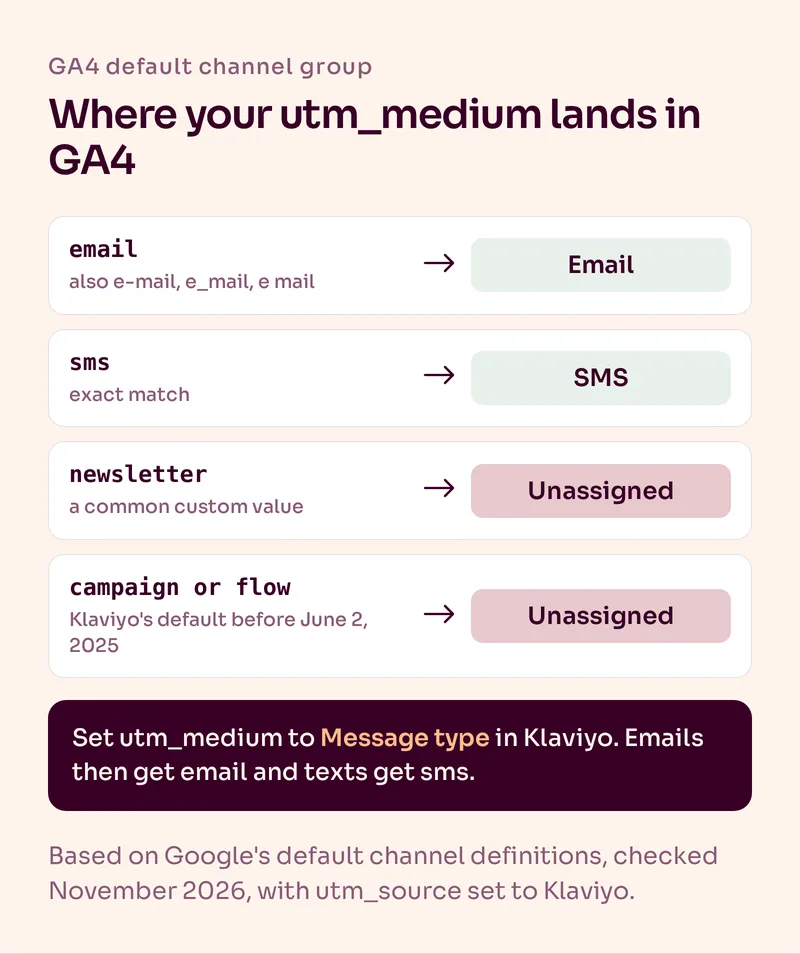
It's an easy one to miss, and Klaviyo accounts have their own version of it. Before June 2, 2025, Klaviyo's default utm_medium values were campaign and flow. Klaviyo changed the default to Message type, but accounts that customized and saved their UTM settings before that date still show the old values. If that's you, GA4 can't file your email visits under Email.
Two ways to check:
- In Klaviyo, open Settings > Other > UTM tracking and look at the utm_medium values for campaigns and flows.
- In GA4, open the Traffic acquisition report, switch the dimension to session source / medium and look for Klaviyo / campaign or Klaviyo / flow.
Same story for SMS. GA4 only counts a visit as SMS when the source or medium is exactly sms, which is what Message type gives your texts.
How Do You Set Up UTM Tracking in Klaviyo?
Set your defaults once in the account settings, then go through your existing flows and campaigns. The account switch doesn't touch messages you already built.
- Click your account name in the bottom left, choose Settings, then Other > UTM tracking.
- Check that utm_medium is set to Message type for both campaigns and flows.
- Turn on utm_campaign and pick a value that names the campaign or flow. Add utm_id if you want IDs too.
- Switch on Automatically add UTM parameters to links, and save.
- Open every live flow, select each message and tick Enable UTM Tracking under its settings. Flow emails have UTM tracking off by default unless that account switch was on when they were added.
- For campaigns, check that Include tracking parameters is on in the Tracking section of the Recipients step. A scheduled campaign has to be paused before you can change its UTMs, and sent campaigns can't be changed at all.
We switch UTM tracking on in every flow email we build. It takes a second per message, and it's an annoying gap to discover months later.
Existing messages: the automatic switch only applies to new campaigns and flow messages.
Custom UTMs: messages with their own message-level UTMs keep them, even after you change the account defaults.
Untracked links: Klaviyo only tags links that start with http:// or https:// and have click tracking on.
SMS: keep Automatically shorten links on, or Klaviyo can't add UTMs to your texts.
The good news: once it's on, Klaviyo tags product blocks and data feed links as well, so you don't have to touch individual buttons. Klaviyo's guide to UTM tracking has the full list of settings.
Why Don't Klaviyo and GA4 Show the Same Revenue?
Because they measure different things. Klaviyo credits orders to messages a profile opened or clicked within its attribution windows. GA4 only sees visits, and credits them according to its own model.
Klaviyo gives its own example: someone opens an email without clicking, then visits the store later and buys. Klaviyo can count that order for the email. GA4 never saw an email click, so it doesn't. That's why Klaviyo's number is usually higher, and why neither number tells you what the email actually caused.
| Klaviyo | GA4 | |
|---|---|---|
| What it tracks | Opens, clicks and orders tied to a profile | Sessions and conversions on your site |
| How email gets credit | An open or click inside Klaviyo's attribution window | A tagged visit, under GA4's attribution model |
| Best for | Comparing campaigns and flows with each other | Seeing what email visitors do on the site |
How we handle it: in our monthly reports we use Klaviyo and Shopify data, and we always call the email number attributed revenue, never incremental. GA4 is the place to see which landing pages email visitors hit and what they do there. For the bigger picture, our guides to Klaviyo attribution and email marketing ROI explain which metrics we put first.
How Do You Use UTMs in Email A/B Tests?
Turn on Track links separately in each variation. Klaviyo then adds a variation letter to the links in each version of the email, so you can compare their traffic.
It's email only, not SMS. To see the letter in GA4, your site's Google Analytics setup has to send it as an event parameter, and you need to create an event-scoped custom dimension before the test starts. If that's too much setup, compare the variations in Klaviyo instead. Our email A/B testing guide covers how we run tests.
What Are the Most Common Email UTM Mistakes?
- utm_medium set to newsletter, campaign or flow. GA4 doesn't recognize those as email.
- Mixed spellings. Klaviyo on automatic links and klaviyo on manual ones split your reports in two.
- Flows left untagged. The account switch was turned on after the flows were built.
- UTMs on links within your own site. Tag the links in your emails, not internal links on your store, or you overwrite where the visit really came from.
- Click tracking turned off. Links without click tracking don't get UTMs.
Summary
Email UTM tracking tells GA4 which visits came from email and which campaign or flow sent them. In Klaviyo, set utm_medium to Message type, turn on utm_campaign, switch on automatic UTMs and then turn tracking on in every existing flow message. Check GA4 for Klaviyo / campaign or Klaviyo / flow, a sign of old default values. And expect GA4 to show less email revenue than Klaviyo, because they count different things.
Want a second view on where customers come from? A post-purchase survey asks them directly. If you'd like us to set up and manage your Klaviyo account properly, including tracking, see our Klaviyo management service.
Frequently Asked Questions
What are UTM parameters in email?
UTM parameters are tags added to the end of the links in your emails, like utm_source, utm_medium and utm_campaign. Google Analytics reads them to record that a visit came from email and from which campaign.
Does Klaviyo add UTM parameters automatically?
Only if you switch on Automatically add UTM parameters to links in Settings > Other > UTM tracking. Even then, it only applies to new messages, so you have to turn tracking on in existing flow emails yourself.
What should utm_medium be for email?
Email. GA4's default Email channel only recognizes email, e-mail, e_mail or e mail as the source or medium. In Klaviyo, the Message type option sets email for emails and sms for texts automatically.
What should utm_source be for Klaviyo emails?
Klaviyo's default is Klaviyo. That's fine, as long as every link uses the same spelling, including links you tag by hand. UTM values are case-sensitive, so Klaviyo and klaviyo count as two sources.
Why is my Klaviyo traffic showing as Unassigned in GA4?
Usually because utm_medium isn't email. Accounts that saved their UTM settings before June 2, 2025 can still use Klaviyo's old values, campaign and flow, which GA4 doesn't match to any default channel.
Why does GA4 show less email revenue than Klaviyo?
Klaviyo can credit an order to an email that was only opened, as long as the order falls inside its attribution window. GA4 only sees visits from tagged links and uses its own attribution model, so it usually shows less.
Want Us to Build and Manage This for You?
Related Reading
Analytics & Testing
Klaviyo Attribution: Can You Trust the Revenue Number?Klaviyo can accurately apply its attribution rules without proving that an email caused the purchase. Here's how attribution works and what we measure alongside it.
Read NowAnalytics & Testing
Email Marketing ROI for Ecommerce: How to Measure What Email Actually ReturnsKlaviyo revenue is not the same thing as economic return. Here is how ecommerce brands should think about email ROI, attribution, costs and downstream customer value.
Read NowAnalytics & Testing
Email A/B Testing for Ecommerce: What to Test and How to Learn FasterA/B testing is useful only when the result changes a future decision. Here is how we prioritize high-impact tests across campaigns, flows, offers, timing and signup forms.
Read NowEmail Automations
Survey Email: How Ecommerce Brands Get Answers They Can Actually UseOne question, the right moment, one click. Which surveys an ecommerce brand should send when, how to build a one-click survey in Klaviyo and what to do with the answers.
Read Now