
Analytics & Testing
How Did You Hear About Us Survey: Questions, Answer Options and Setup
Quick answer: A how did you hear about us survey asks new customers, right after they buy, which channel first brought them to your store. Ask it on the Shopify thank-you page as one optional, single-choice question with six to ten answer options plus "Other", written in your customers' words. Then read the answers next to what your ad platforms and Google Analytics report. Where they disagree is where you dig in.
Every ad platform you run will happily claim the same order. Google Analytics gives it to whatever got the last click.
None of them saw the podcast, the friend's recommendation or the ChatGPT answer that actually sent the customer your way.
So ask. It's one question and it costs next to nothing. Quite often it tells you something no dashboard can.
By Emiel Dingemans, Founder of Magicianly
Updated
What Is a How Did You Hear About Us Survey?
A how did you hear about us survey (often shortened to HDYHAU) is a one-question survey that asks customers where they first found your brand. Because customers answer it themselves, it's also called self-reported attribution.
For ecommerce brands it usually sits on the thank-you page, the page Shopify shows right after checkout. Each answer is tied to an order, so you can see the revenue behind each answer as well as the count.
Why Ask When You Already Have Attribution Data?
Because tracking only sees clicks, and a lot of buying decisions start somewhere nobody clicks. A survey shows what customers remember. It doesn't replace your tracking. It fills the gaps.
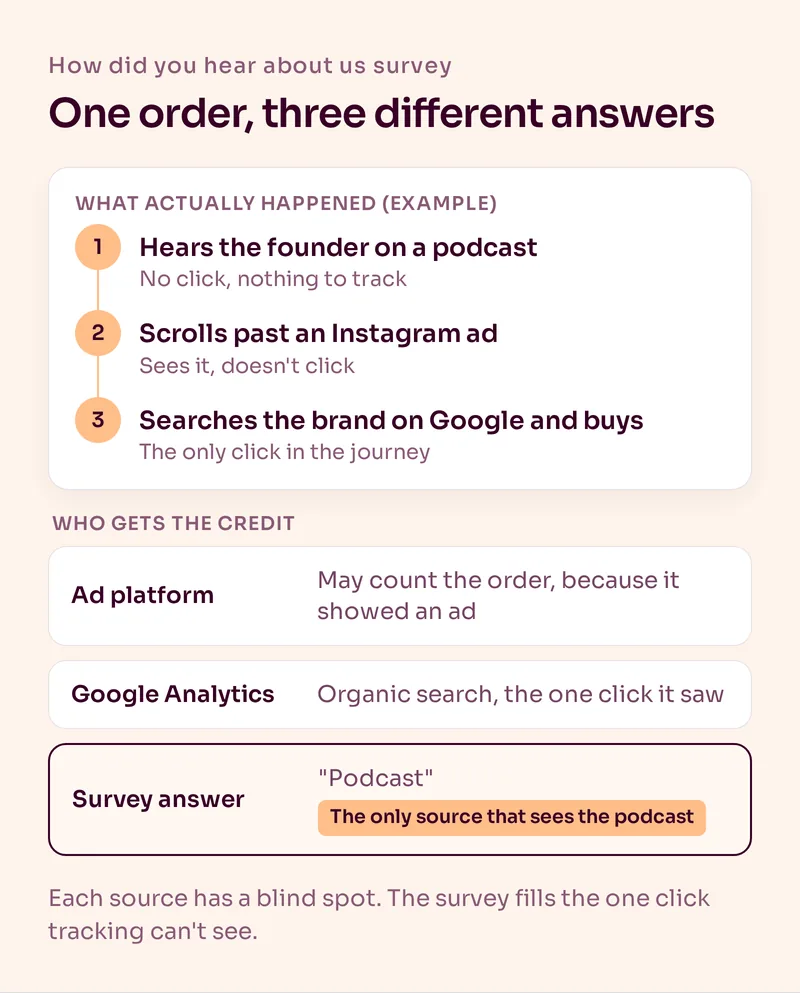
Think about how people actually find a brand. Someone hears a founder on a podcast, sees the product at a friend's place, then searches your name on Google a week later. Google Analytics files that order under organic search. An ad platform may count it too, if it showed them an ad along the way. Only the survey says "podcast".
It's the same reason we never treat Klaviyo's attributed revenue as the truth. Every source has its own blind spot, and we explain Klaviyo's in our guide to Klaviyo attribution.
Where Should You Ask "How Did You Hear About Us?"
On the thank-you page, right after checkout. The answer is fresh, almost every buyer sees the page, and the payment is already done, so the question can't cost you the order.
On Shopify you need an app for that. Shopify has no survey of its own for the thank-you page, so you install a post-purchase survey app and add its block to the page. According to Shopify's Help Center, apps that customize the thank-you and order status pages work on the Basic plan and higher, so you don't need Shopify Plus.
Had a survey running as a script in your checkout settings? Check it's still there. Shopify removed script tags from the Order status page for the last group of stores on August 26, 2026. A survey that wasn't rebuilt as an app block may have stopped collecting answers without anyone noticing.
Places we'd skip:
- The signup popup. People haven't bought yet, and that step is better used for a question that shapes your welcome flow. Our guide to survey emails covers that one.
- An email two weeks later. Fewer people answer, and the ones who do half remember.
- Anywhere before payment. Never put a question between a customer and the pay button.
Which Answer Options Should You Use?
Six to ten options, plus "Other" with a text field. Name channels the way customers talk about them, and only list channels you actually use or would act on.
| Answer option | Why it's on the list | Follow-up question |
|---|---|---|
| Kept apart from Facebook, because the audience and creative differ | "Was it an ad or a creator?" | |
| Still a big acquisition channel for many brands | None | |
| TikTok | Often under-credited by click tracking | "Was it an ad or a creator?" |
| YouTube | Videos and reviews often lead to a search later | "Which channel?" |
| Google or another search engine | People who searched for a product or a problem | None |
| Podcast | Close to invisible in click data | "Which podcast?" |
| Friend or family | Word of mouth, also invisible in click data | None |
| ChatGPT or another AI assistant | A newer channel that click tracking barely sees | "Which one?" |
| Other | Catches everything you didn't list | Free text |
A few rules we'd stick to:
- One answer only. Letting people tick several sounds more accurate, but you end up with answers you can't add up.
- Shuffle the options if your app allows it, and keep "Other" last. People tend to pick from the top of a list.
- Ask first-time customers only. Returning customers tend to answer "email" or "I've bought before", which tells you nothing about acquisition.
- Make it optional. A required question on a thank-you page annoys people who just paid you.
- Read "Other" every month. If the same answer keeps turning up, give it its own option.
How Did You Hear About Us Survey Template
Here's a version you can copy into your survey app. Swap in your own channels.
Heading: One quick question
Question: How did you first hear about us?
Options (shuffled): Instagram, Facebook, TikTok, YouTube, Google or another search engine, Podcast, Friend or family, ChatGPT or another AI assistant
Last option: Other (please tell us)
Follow-up for Podcast, YouTube or AI assistant: Which one?
After they answer: Thanks, that really helps us.
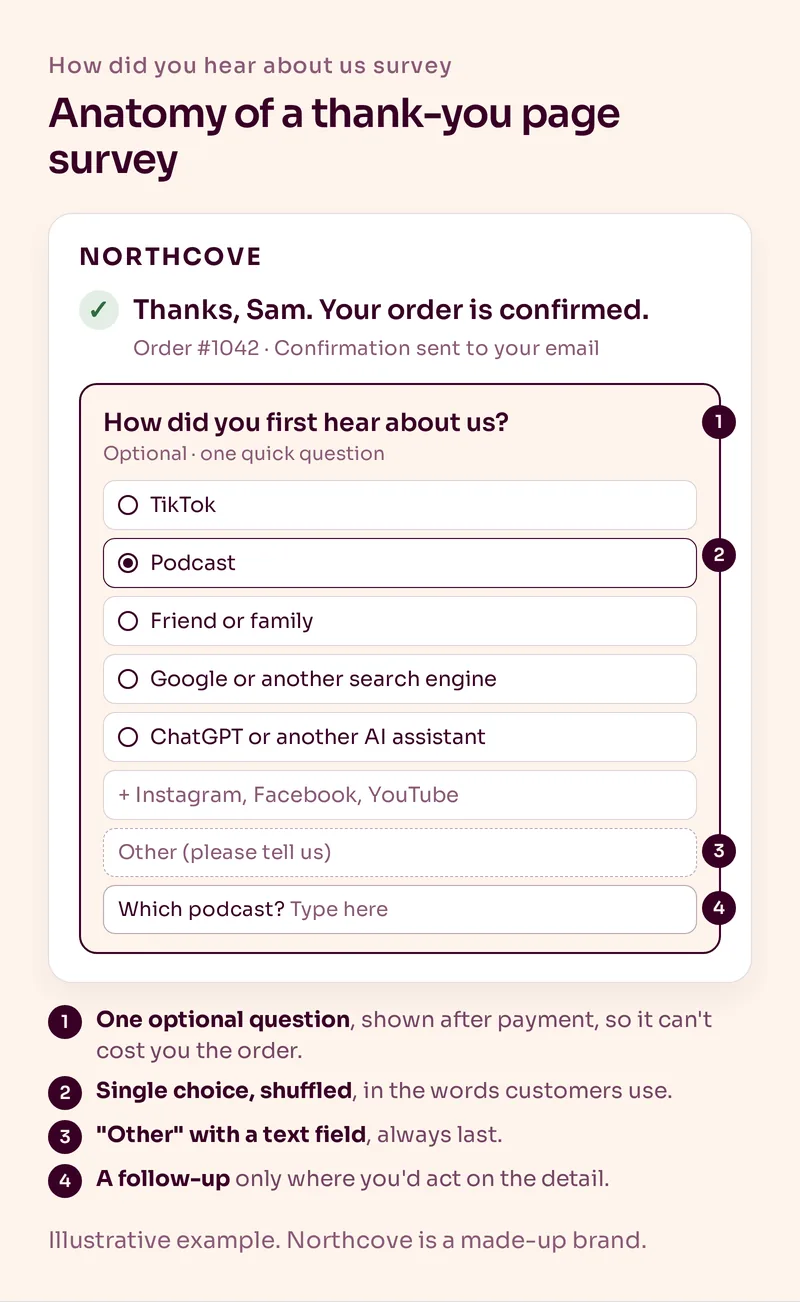
The word "first" is there on purpose. Ask what made them buy today and you'll hear "the email" or "the discount" far more often, which is a different question. Pick one meaning and keep it, or your month-to-month comparison breaks.
How Do You Set It Up on Shopify?
Pick an app, set up the question, add the block and test it with a real order.
- Choose a post-purchase survey app. Fairing and KNO are two built for exactly this. Fairing has a free plan and KNO starts at $19 a month, according to their Shopify App Store listings in November 2026.
- Set up the question and options from the template above, and show the survey to first-time customers only.
- In your Shopify admin, go to Settings > Checkout and add the app's block to the thank-you page in the checkout and accounts editor. Most apps can add it to the order status page too.
- Connect the app to Klaviyo if it supports it, so each answer lands on the customer's profile. Fairing lists a Klaviyo integration.
- Place a test order and check two things: the question shows properly on mobile, and your answer turns up in the app and on your Klaviyo profile.
How Should You Read the Answers?
As a second opinion next to your other data, over months rather than days. Compare each channel's share of answers with its share of your spend, then look at what each group does after the first order.
What we'd look at every month:
- Share of answers vs share of spend. If a channel takes a big slice of your budget and gets a small slice of the answers, find out why before you spend more on it.
- Revenue per answer. Most survey apps tie each answer to its order, so you can see revenue and order value per channel.
- Repeat purchases per answer. The one we care about most. Some channels bring customers who come back, others bring one-off buyers. Once enough time has passed, compare the first-to-second purchase rate per answer. Fewer customers who keep coming back can be worth more than a bigger group who don't.
- What's growing in "Other". That's where new channels show up first, AI assistants included.
Small numbers lie. Wait until a channel has a decent number of answers before acting on it, and never move budget on one month of data.
Once the answers are on Klaviyo profiles, you can use them in your emails as well. Customers who answered "Friend or family" are the obvious group for a referral ask in your post-purchase flow.
The survey shows what people remember. UTM tags show what they clicked. You want both, so here's how we set up email UTM tracking.
What Are the Most Common Mistakes?
- Too many options. Give people twenty choices and they pick the first one that sort of fits.
- No "Other". Without it, people pick the nearest wrong answer and you never find out.
- Asking returning customers. You measure loyalty, not acquisition.
- Changing the question or options all the time. Each change breaks your trend line. If you must change it, note the date.
- Treating it as the truth. People misremember. It's one view, not the answer.
- Never reading it. If nobody looks at the answers each month, remove the survey.
Summary
A how did you hear about us survey is one optional question on your thank-you page that asks first-time customers where they first found you. Use six to ten options in your customers' words, plus "Other", allow one answer, shuffle the order and keep the wording stable. Read the answers monthly next to your ad platforms and Google Analytics, and pay most attention to which channels bring customers who buy again.
That last part is where the survey connects to retention. For the email side of your reporting, these are the email marketing KPIs we track. If you'd like us to build a retention program around data like this, see our retention marketing service.
Frequently Asked Questions
What is a how did you hear about us survey?
It's a one-question survey that asks customers how they first found your brand. Ecommerce brands usually show it on the thank-you page after checkout. Because customers answer it themselves, it's also called self-reported attribution.
Where should you ask "How did you hear about us?"
On the thank-you page right after checkout. The answer is fresh, almost every buyer sees the page and the payment is already done. Asking by email weeks later gets fewer answers and less reliable ones.
What are good answer options for how did you hear about us?
Six to ten channels you actually use, named the way customers talk, plus "Other" with a text field. For most direct-to-consumer brands that means options like Instagram, TikTok, YouTube, Google, podcast, friend or family and an AI assistant like ChatGPT.
Should the how did you hear about us question be required?
No. Make it optional. A required question on the thank-you page annoys customers who just paid, and you'd rather have fewer honest answers than rushed ones.
Are post-purchase attribution surveys accurate?
They're accurate about what customers remember, not about every touchpoint. People forget and simplify. That's why we read survey answers next to ad platform and Google Analytics data and never treat any single source as the truth.
Do you need Shopify Plus for a thank-you page survey?
No. Shopify says apps that customize the thank-you and order status pages are available on the Basic plan and higher. Only apps that change the information, shipping and payment steps of checkout need Shopify Plus.
Want Us to Build and Manage This for You?
Related Reading
Email Automations
Survey Email: How Ecommerce Brands Get Answers They Can Actually UseOne question, the right moment, one click. Which surveys an ecommerce brand should send when, how to build a one-click survey in Klaviyo and what to do with the answers.
Read NowAnalytics & Testing
Klaviyo Attribution: Can You Trust the Revenue Number?Klaviyo can accurately apply its attribution rules without proving that an email caused the purchase. Here's how attribution works and what we measure alongside it.
Read NowAnalytics & Testing
Email UTM Tracking: How to Set Up UTMs in Klaviyo for GA4If GA4 shows hardly any email traffic, check your links. The UTM parameters to use, the Klaviyo settings that catch people out and why GA4 and Klaviyo never match.
Read NowAnalytics & Testing
Email Marketing KPIs: What We Track Every Month and the Targets We UseOpen rate 45% or higher, click rate 0.5% or higher and the retention numbers that matter more. The email KPIs we report on every month and how we read them.
Read Now