
SMS & WhatsApp
SMS Opt-In: How to Collect Text Message Consent the Right Way
Quick answer: SMS opt-in is someone's explicit agreement to get text messages from your brand. In the US that means written consent, collected separately from email, with disclosure language right above the button: your brand name, what you'll send, how often, that message and data rates may apply, that consent isn't a condition of purchase, and how to text STOP or HELP. Then you send a confirmation text. Our default setup is a multi-step popup that asks for the phone number on the step after the email, plus the SMS checkbox at Shopify checkout.
Collecting phone numbers is easy.
Collecting them in a way that holds up takes a bit more care. One missing line of disclosure text, or an SMS field that looks required, and your fastest channel turns into a legal risk.
The good news: you only have to set this up properly once. This is general marketing guidance, not legal advice, so have your legal or compliance team check your actual program.
By Emiel Dingemans, Founder of Magicianly
Updated
What Is SMS Opt-In?
SMS opt-in is a person's explicit agreement to receive text messages from your brand. Without it, you can't text them, even if you already have their number.
That catches a lot of brands out. A phone number someone typed in at checkout isn't SMS consent. Neither is an email subscription. Klaviyo is clear that consent has to be given to your brand specifically, so purchased lists, lead-generation lists and affiliate lists don't count.
You need consent for marketing texts (promos, cart reminders, launches) and for transactional texts (order and shipping updates). In Klaviyo, a STOP reply removes both.
What Does an SMS Opt-In Need to Include?
Clear disclosure language, placed right above the opt-in button or checkbox, everywhere you collect phone numbers. People have to know what they're signing up for before they tap.
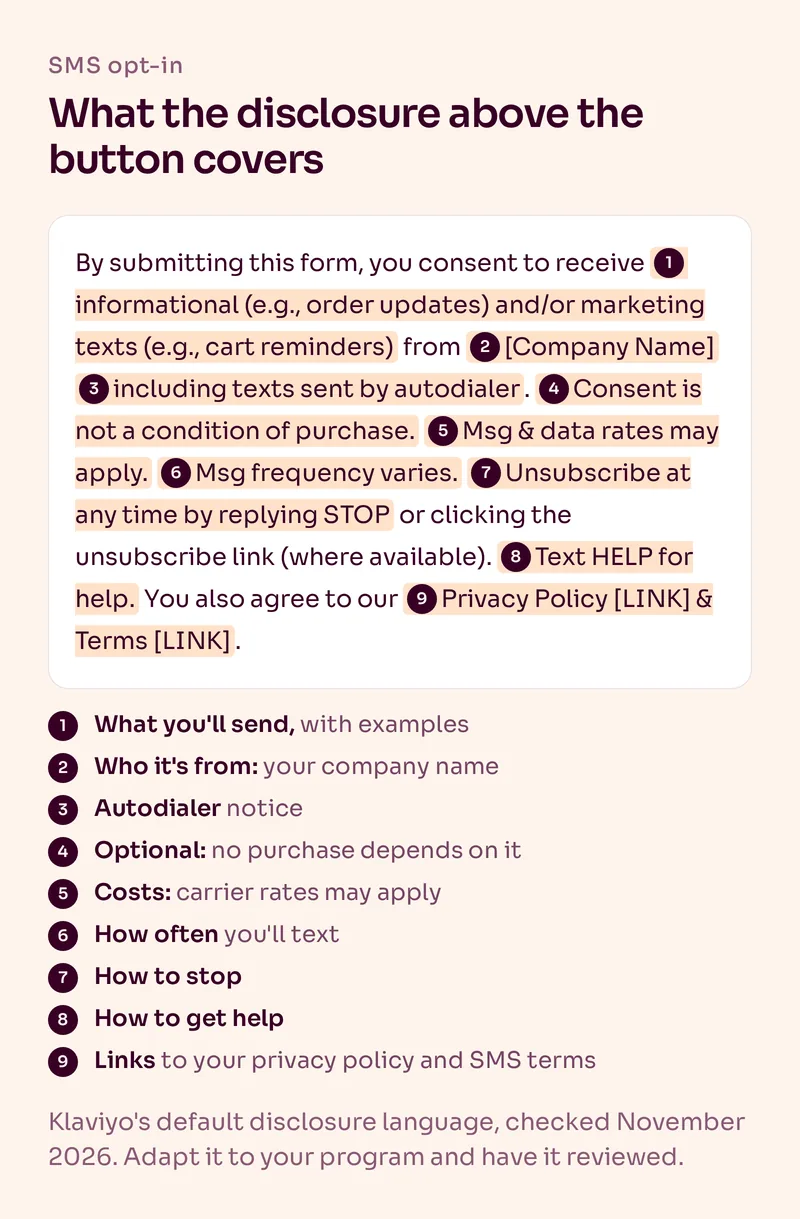
According to Klaviyo's guide to SMS disclosure language, the text should cover:
- your company or brand name
- the kind of texts you'll send, with examples like "promos or cart reminders"
- how often you'll text ("Msg frequency varies" is fine)
- that message and data rates may apply
- that consent is not a condition of purchase
- that texts may be sent by autodialer
- how to get help and how to opt out, for example "Text HELP for help. Reply STOP to cancel."
- links to your SMS terms and your privacy policy
Klaviyo generates a default version for you under Settings > Text message > Terms of Service. One catch we see all the time: changing that account-level text doesn't update forms that already exist. You have to update the disclosure in each live form separately.
If you're applying for a US short code, you may need to adapt the wording before your application gets approved.
Where Should You Collect SMS Opt-Ins?
Start with two places: your signup popup and your Shopify checkout. Add the other methods once your core SMS flows are live.
| Method | How it works | When we use it |
|---|---|---|
| Popup, phone step after email | The phone field sits on its own step, with the disclosure above the button | Always. It's the biggest source for most brands |
| Shopify checkout checkbox | Customers tick the SMS box under marketing options, and Klaviyo syncs the consent | Always. Switch it on from day one |
| Email to current subscribers | Link to a page with an SMS form, or use a Klaviyo SMS subscribe link | After launch, sent to engaged subscribers and VIPs |
| Keyword or subscribe link | People text a keyword or tap a link from ads, social posts or packaging | When your sending number can receive texts |
| Third-party quiz or form | A connected tool passes consent to Klaviyo through an integration or the API | Only if the tool shows proper disclosure too |
Klaviyo calls popups and checkout the basic methods, and suggests waiting with the rest until your SMS welcome, abandoned cart and post-purchase flows are set up. We agree. There's no point promoting a keyword before you have flows ready for the people who join. Our Klaviyo SMS guide walks through the checkout sync settings.
How Do We Set Up the SMS Opt-In in a Popup?
We ask for the phone number on its own step, right after the email. Never on the same step.
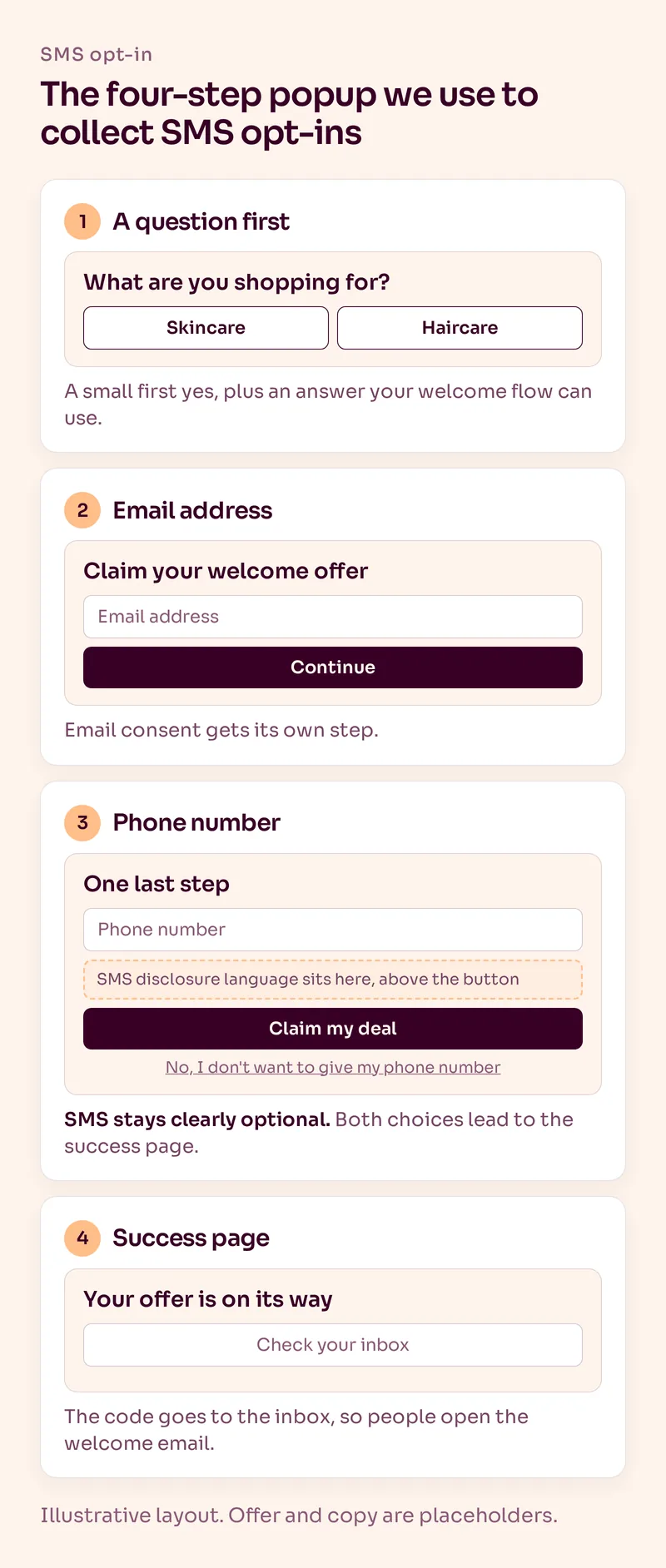
Here's the four-step format we build for most brands:
- A question first. Something easy, like what they're shopping for. It's a small first yes, and the answer tells your welcome flow what to talk about. More on that in our guide to popup signup rates.
- The email address. This is where people claim the offer.
- The phone number. A headline like "One last step", the phone field, the disclosure above the button, a "Claim my deal" button and a small "No, I don't want to give my phone number" link. Both choices lead to the success page.
- The success page. We don't show the discount code here. It goes to the inbox, so people actually open the welcome email.
Why separate steps? Because Klaviyo recommends it. Asking for email and phone on the same step can make SMS look required, and SMS consent that looks forced is a compliance problem even if it's technically optional. If you really need a single-step form, label the phone field as optional and use double opt-in.
On the angle: "One last step" with the same offer tends to work best for us. A bigger SMS-only offer or a VIP club angle are worth testing against it.
You can build this in Klaviyo's own forms. For Shopify brands we usually use Alia, because multi-step forms with a question first are easy to build and test there.
Affiliate link: we may earn a commission. We recommend Alia because we use it, not because of the commission.
Staying in Klaviyo? On a paid Klaviyo SMS plan, Smart Opt-in lets people confirm with a one-time code right inside the form.
Should SMS Opt-In Be Single or Double?
Double. It's the opposite of our email rule, and we explain why in our article on single vs double opt-in.
With double opt-in, someone has to confirm before you send them marketing texts. Klaviyo points out that sending the confirmation request alone doesn't complete it. The person has to actually reply or confirm. As a bonus, the confirmation checks that the number is real and gives you an electronic record of their consent.
What Should the Confirmation Text Say?
Who you are, what they just signed up for, how often you'll text and how to get help or stop. Keep it short enough to fit in one SMS segment, which our SMS character limit guide explains.
Double opt-in request: "Northcove: Reply Y to confirm you want texts from us, including promos and cart reminders. Msg frequency varies. Msg & data rates may apply. Reply HELP for help, STOP to cancel."
After they confirm: "Northcove: You're in! Your welcome code is on its way. Reply STOP to opt out."
Keyword reply: "Northcove: Thanks for texting JOIN. Reply Y to confirm and we'll send your welcome code. Msg & data rates may apply. Reply STOP to cancel."
Northcove is a made-up brand, and these are examples, not legal templates. Klaviyo's US guidance is to repeat your opt-out instructions at regular intervals and at least once a month, so don't treat the welcome text as the only place STOP appears.
What Are the Most Common SMS Opt-In Mistakes?
These are the ones we fix most often when we take over an account:
- One checkbox for email and SMS. Klaviyo says SMS needs its own checkbox or button. A general "agree to marketing" box isn't enough.
- An SMS field that looks required. Same step as the email, no "optional" label, no way to skip it.
- Old disclosure on live forms. The account setting was updated, the forms weren't.
- Texting checkout numbers without SMS consent. If the customer didn't tick the SMS box, you can't text them marketing.
- Missing opt-outs that come in another way. People also unsubscribe by email, phone or DM. Federal rules require you to honor that within a reasonable time, and no later than 10 business days. Remove the consent on the profile itself. Taking them off a list isn't enough.
- Texting outside quiet hours. The TCPA bans marketing texts before 8 a.m. and after 9 p.m. in the recipient's time zone, and some states are stricter.
None of this is box-ticking for the sake of it. Klaviyo's overview of US SMS laws notes that private TCPA lawsuits can seek $500 per violation, and up to three times that for willful violations.
Summary
SMS opt-in means explicit, separate consent for texts, with disclosure language above the button that says who you are, what you'll send, how often, the costs and how to stop. Collect it on a popup step after the email and at Shopify checkout first. Use double opt-in, send a clear confirmation text and keep your forms' disclosure up to date.
For what to send once people are on the list, read our SMS marketing best practices. And if you'd rather have us set up and run the whole channel, take a look at our SMS marketing service.
Frequently Asked Questions
What does SMS opt-in mean?
SMS opt-in means a person has explicitly agreed to receive text messages from your brand, usually by entering their number in a signup form, ticking an SMS box at checkout or texting a keyword. Without it, you can't send them texts.
Do email subscribers count as SMS subscribers?
No. Email consent doesn't give you SMS consent, even if the subscriber shared their phone number. SMS consent has to be collected separately, with its own checkbox or button.
What should SMS opt-in language include?
Your brand name, the type of texts you'll send, how often, that message and data rates may apply, that consent isn't a condition of purchase, that texts may be sent by autodialer, how to get help and opt out, and links to your SMS terms and privacy policy.
Should I use double opt-in for SMS?
Yes. We use single opt-in for email but double opt-in for SMS. The subscriber confirms by text before you send any marketing messages, which also checks the number and gives you a record of their consent.
Can I collect SMS opt-ins at Shopify checkout?
Yes. Turn on the SMS option under marketing options in Shopify's checkout settings and enable the SMS subscriber sync in Klaviyo's Shopify integration. Only customers who tick the SMS box count as subscribed.
How do people opt out of SMS?
Most people reply STOP, which in Klaviyo removes both marketing and transactional SMS consent. If someone opts out another way, such as by email, remove their SMS consent on their profile within 10 business days at most.
Want Us to Build and Manage This for You?
Related Reading
SMS & WhatsApp
Klaviyo SMS Marketing: How to Set It Up and What's Worth SendingAlready on Klaviyo and not sure SMS is worth it? How to set it up, what a send really costs, and the campaigns and flows we'd text first.
Read NowList Growth
Single vs Double Opt-In: Which Should Your Ecommerce Brand Use?Double opt-in keeps your list clean but costs you real subscribers. When we use single vs double opt-in for email and SMS, and how to change it in Klaviyo.
Read NowSMS & WhatsApp
SMS Marketing Best Practices for Ecommerce: How We Actually Use SMSSMS is not email with fewer characters. Here's how we use it for ecommerce without burning the list, training customers to ignore texts or destroying opt-in value.
Read NowList Growth
What Is a Good Popup Signup Rate for Ecommerce?Most popups are set up once and never touched again. Here is what a good signup rate looks like, how to calculate yours properly and the two levers that move it most.
Read Now