
Email Automations
Order Cancellation and Refund Emails: What to Send and What to Switch Off
Quick answer: An order cancellation email confirms that an order won't ship and what happens to the payment. A refund email confirms how much was refunded, to which payment method and when the customer can expect it. On Shopify, both go out as built-in notifications, Order canceled and Order refund, unless you untick the notification when you cancel or refund. Keep them short, clear about the money and free of promotions. Then make sure your marketing flows stop, so a refunded customer doesn't get a review request two days later.
Nobody enjoys sending these.
A cancellation or refund usually means something went wrong. An item sold out, a payment failed, or the customer changed their mind. The email can't undo that.
It can stop it getting worse, though. Be clear about the money, and don't follow up with "How are you enjoying your order?"
By Emiel Dingemans, Founder of Magicianly
Updated
What Is an Order Cancellation Email?
An order cancellation email tells the customer their order has been canceled and won't ship. It's a transactional email, so its job is information, not selling.
On Shopify it's the Order canceled notification. It goes out when you cancel an order in your admin, because "Send a notification to the customer" is selected by default. You can untick it per order, for example when you've already emailed the customer yourself.
What Is a Refund Email?
A refund email confirms that money is on its way back to the customer. On Shopify it's the Order refund notification, sent when you issue a refund, full or partial, unless you untick the notification.
This is about the emails your store sends. If you're looking for how to answer a customer who emails you asking for a refund, that's a customer service template, not a lifecycle email.
What Should a Cancellation or Refund Email Include?
The order number, what was canceled or refunded, the exact amount, where the money goes, roughly when it arrives and how to get help. The reason is worth adding when it helps the customer understand.
| Cancellation email | Refund email | |
|---|---|---|
| Order number | Yes | Yes |
| What it covers | The whole order | The refunded items, and shipping if you refunded it |
| Amount | The amount refunded, or that they weren't charged | The exact amount refunded |
| Where the money goes | Original payment method or store credit | Original payment method or store credit |
| When it arrives | A realistic window from your payment provider | A realistic window from your payment provider |
| Reason | When it helps, like sold out or payment declined | Optional |
| Help | Reply to this email, or a support link | Reply to this email, or a support link |
If you refund to store credit, say so clearly, explain how to use it and mention any expiry date. Shopify lets you set one, but store credit expiry rules differ by country, so check yours first.
Should the Email Change Based on Why the Order Was Canceled?
Yes, and on Shopify it can. When you cancel an order, you choose a reason, and the Order canceled template can read it. Shopify's reasons are inventory, customer, declined, fraud and other, so one template can say five different things.
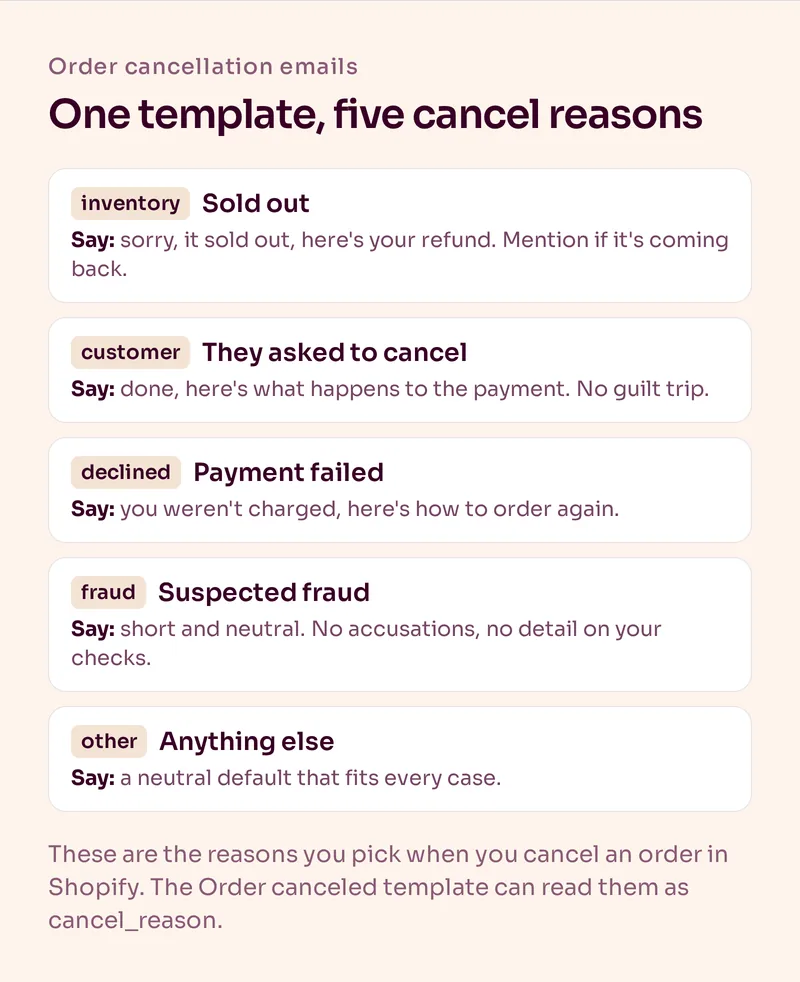
- Inventory: apologize, say plainly that the item sold out and confirm the refund. If the item is coming back, say so.
- Customer: confirm the cancellation they asked for. Short and friendly, no guilt trip.
- Declined: the payment didn't go through. Tell them they weren't charged and how to place the order again.
- Fraud: keep it short and neutral. Don't accuse anyone and don't explain your fraud checks.
- Other: a neutral default that works for anything.
In the template code, that's a condition like {% if cancel_reason == "inventory" %} around each version. Shopify lists the variable in its notification variables reference. If you'd rather not edit code, this is a small job for a Shopify developer.
Should You Send These From Shopify or Klaviyo?
For most brands, Shopify. It sends them by default, its template knows the cancel reason, and its refund notification also covers partial refunds.
Klaviyo sees these events too, but with gaps. According to Klaviyo's Shopify data reference, its Cancelled Order event is tracked when an order is canceled before fulfillment, and its Refunded Order event only fires when an order is refunded in full. Partial refunds don't trigger it.
If you want these emails to look like your Klaviyo emails, design them in Klaviyo and paste the HTML into Shopify, the same way we recommend for the order confirmation email. Shopify still does the sending.
Sending them from Klaviyo instead takes more work than it's worth for most stores:
- each email has to be approved by Klaviyo as transactional, which can take up to 24 hours, and editing it later removes that status;
- Shopify's version still goes out unless you untick the notification on every cancel and refund, or you're on Shopify Plus and ask Shopify Support to turn it off (Shopify's notification settings explain both);
- partial refunds wouldn't get an email at all.
Which Marketing Emails Should Stop After a Cancellation or Refund?
Anything that assumes the customer has the product: post-purchase education, cross-sells, review requests and replenishment reminders. In Klaviyo, add a profile filter to those flows: has Cancelled Order zero times since starting this flow, plus the same condition for Refunded Order.
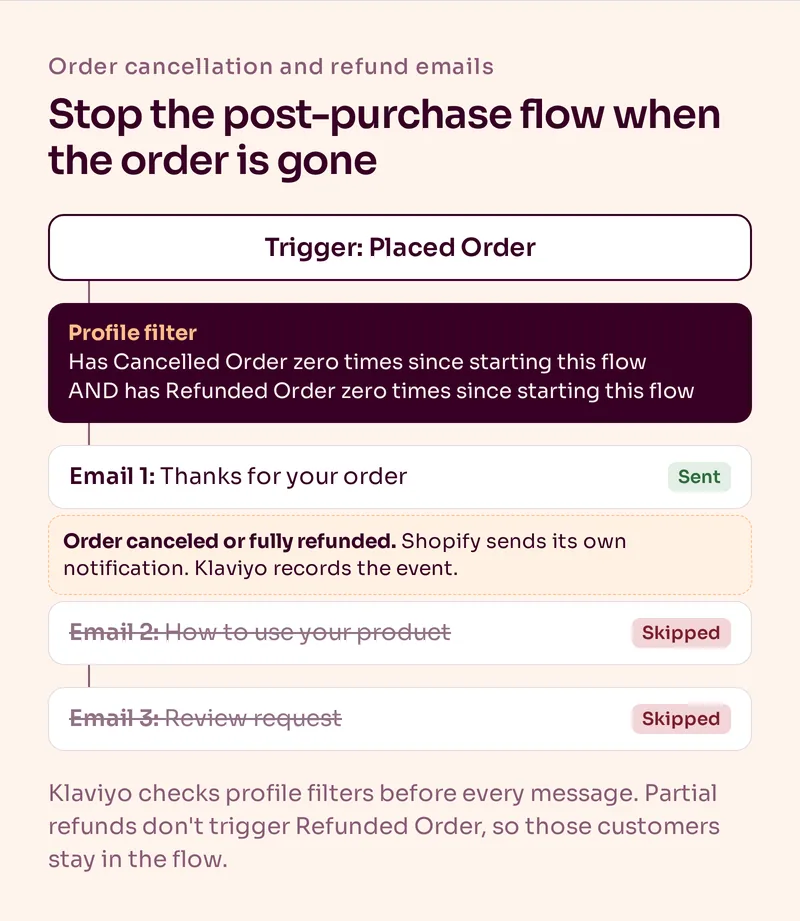
Klaviyo checks profile filters before every message in a flow. So when an order is canceled after the customer entered your post-purchase flow, the remaining emails get skipped.
It's an easy step to miss. A post-purchase flow triggered by Placed Order keeps running after a cancellation unless something tells it to stop. The customer gets a refund and then, a few days later, a review request for a product they never received.
Two things the filter won't catch:
- Partial refunds. They don't trigger Refunded Order, so that customer stays in the flow. If partial refunds are common for you, check that your review request asks about a product they kept.
- Your campaigns. Filters only work inside flows. A recently refunded customer is still in your campaign segments, which is usually fine, as long as nothing in that campaign assumes they own the product.
For fraud cancellations, consider suppressing the profile so it doesn't receive marketing at all.
Can You Put a Discount in a Cancellation or Refund Email?
No. A cancellation or refund email is transactional, and a coupon turns it into marketing, both in Klaviyo's rules and in the way US law looks at an email's primary purpose. We explain the difference in our guide to transactional vs marketing emails.
If you want to win the customer back, do it in a separate marketing email to people who opted in, sent later, when you have a real reason. An item that sold out and is now back in stock is the cleanest one.
Order Cancellation and Refund Email Templates
Three examples you can adapt. Northcove is a made-up brand, and the brackets are placeholders for Shopify's order details.
1. Canceled because an item sold out
Subject: Your order [order number] has been canceled
Body: "Hi [first name], we're really sorry. [Product] sold out before we could pack your order, so we've canceled it and refunded [amount] to your [payment method]. Your bank may take a few business days to show it. Questions? Just reply to this email. [Name], Northcove"
2. Canceled at the customer's request
Subject: Order [order number] canceled, as requested
Body: "Hi [first name], done. Your order [order number] is canceled and [amount] is on its way back to your [payment method]. If that wasn't what you meant to do, reply to this email and we'll sort it out."
3. Refund confirmation
Subject: Your refund of [amount] is on its way
Body: "Hi [first name], we've refunded [amount] for [items] from order [order number] to your [payment method]. Your bank may take a few business days to process it. Anything else we can help with? Just reply."
Notice what's missing: no product grid, no discount, no "you might also like".
What Are the Most Common Mistakes?
- Two emails for one cancellation. Shopify's notification plus a Klaviyo flow you built on Cancelled Order.
- Review requests after a refund. A Cancelled Order and Refunded Order filter fixes this.
- Vague money details. "Your refund has been processed" without an amount or payment method gets you a support ticket.
- A discount code in the email. It turns a transactional email into marketing.
- Accusing someone of fraud. Keep fraud cancellations neutral.
- Canceling already refunded orders in bulk. Shopify warns this can trigger duplicate refunds. Cancel those one at a time.
Summary
Order cancellation and refund emails should say what was canceled or refunded, how much, where the money goes, roughly when it arrives and how to get help. On Shopify, keep them as Shopify notifications, tailor the cancellation email to the cancel reason and design them in Klaviyo if you want them on brand. Then add Cancelled Order and Refunded Order filters to your post-purchase flows in Klaviyo, so no refunded customer gets asked how they like a product they sent back.
Most of the work here is in your flows, starting with your post-purchase email sequence. If you'd like us to build and maintain them for you, see our email automation service.
Frequently Asked Questions
What should an order cancellation email say?
That the order is canceled and won't ship, the order number, what happens to the payment and how to get help. Add the reason when it helps, like an item selling out or a declined payment. Leave out promotions.
What should a refund email include?
The order number, the refunded items, the exact amount, the payment method or store credit it went to, a realistic window for when it arrives and a way to get help. Keep it short and free of discount codes.
Does Shopify send a cancellation email automatically?
Yes. When you cancel an order, Shopify sends the Order canceled notification, because "Send a notification to the customer" is selected by default. You can untick it for that order if you don't want it to go out.
Does Klaviyo track refunds from Shopify?
Yes, as the Refunded Order event, but only when an order is refunded in full. Partial refunds don't trigger it. Canceled orders show up as the Cancelled Order event.
Can you include a discount code in a cancellation email?
We wouldn't. A coupon turns a transactional email into marketing, which breaks Klaviyo's transactional rules and can change how the email is treated legally. Win the customer back later in a separate marketing email.
How do you stop post-purchase emails after a refund in Klaviyo?
Add a profile filter to your post-purchase flows: has Cancelled Order zero times since starting this flow, and the same for Refunded Order. Klaviyo checks filters before each message, so the remaining emails are skipped.
Want Us to Build and Manage This for You?
Related Reading
Email Automations
Order Confirmation Email: What to Include, a Template and ExamplesWhat your order confirmation email should include, a template you can copy, examples by brand type, and how to set it up in Shopify or Klaviyo.
Read NowEmail Automations
What's the Difference Between Transactional and Marketing Emails in Ecommerce?Order and shipping emails aren't a hidden ad slot. Keep them clean and useful, then let your post-purchase flow do the selling a few minutes later.
Read NowEmail Automations
Post-Purchase Email Sequence: How to Drive the Second PurchaseA good post-purchase sequence should do more than say thanks. Here is the email-by-email framework we use to improve the customer experience and create the next purchase.
Read NowEmail Automations
Review Request Emails: When to Send Them and How to Get More ReviewsDay 7 is not a review strategy. How we time review request emails by product, why the reminder matters, and how to offer a gift without breaking the rules.
Read Now